ServiceTitan can work with a WordPress website. Its Scheduling Pro documentation explains how to install a booking script and connect a website button to the scheduler.[8] You do not have to replace WordPress to use that documented connection.
Choose your next step
- Change website providers while keeping ServiceTitan
- Should we keep, repair, or rebuild our website?
- Can we choose a separate website provider?
- Which type of connection do we need?
- How does WordPress setup work?
- Verify booking requests, office alerts and customer confirmation
- Decide what Marketing Pro handles and who owns the remaining work
- How should we compare costs?
- Where can KKS help?
- Who owns implementation and approval?
WordPress runs your public website. ServiceTitan runs contractor operations such as scheduling, dispatch, call booking, and invoicing.[6] The connection between them should help a customer request the right service and give your office the information it needs to respond.
For an owner buying software or reviewing an agency, these are separate decisions. Keep the operating software that fits the business. Choose the website provider based on the work it will deliver, the accounts you control, and what happens when a customer contacts you.
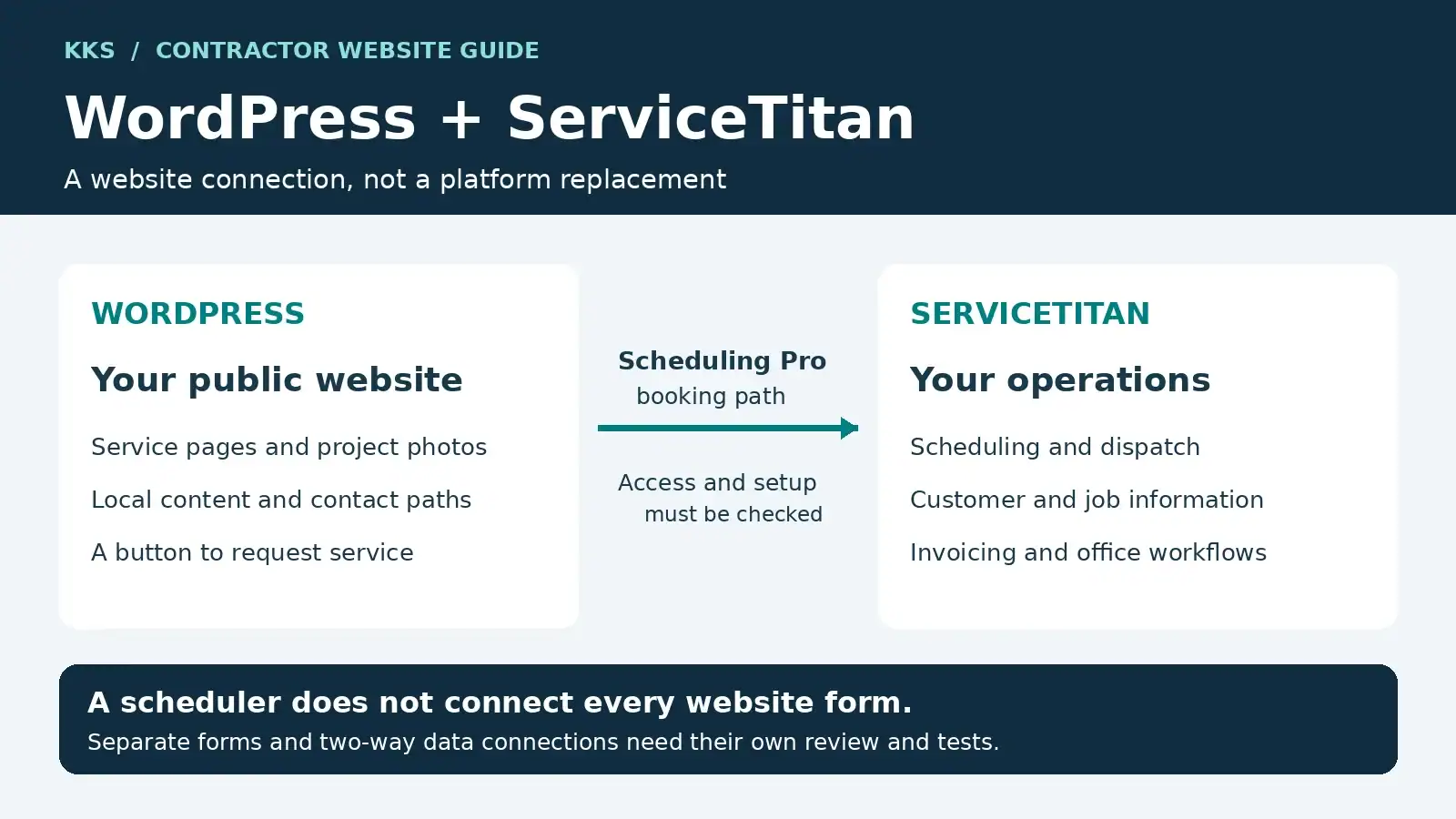
WordPress: your public website
Service pages, project photos, local content, and contact paths.
Scheduling Pro: the booking connection
A website button opens the scheduler. Confirm product access and setup.
ServiceTitan: your operations
Scheduling, dispatch, customer and job information, and invoicing.
A scheduler does not connect every website form. Other forms and two-way connections need separate review.
Keep, repair, or rebuild your website
Start with the site you have. The decision should follow an inspection of its content, account access, and customer contact paths, rather than an assumption that new operating software requires a new website.
Keep it when the website is doing its job
Your pages explain the services you want to sell, visitors can contact you, and usable inquiries reach the office. Keep that foundation. Check the booking connection and reporting before paying to replace something that works.
Repair it when the weakness is specific
The service pages are useful, but a form fails, a booking button confuses customers, or the office cannot identify where an inquiry came from. Fix and test those paths before buying more traffic. A focused repair can preserve the content and account history you already have.
Compare a rebuild when the structure holds you back
You cannot control the website, add the service content you need, or support the required customer contact process. Compare the cost and limits of repairing it with a rebuild. Include content migration, account ownership, existing URLs, and the booking setup in the proposal.
Need a website that works alongside ServiceTitan?
KKS offers managed WordPress websites and improvements to suitable existing sites.[1] Tell us what you want the website to do and how your office handles incoming work. We can discuss a repair or rebuild without asking you to replace operating software that fits your business.
Your website and ServiceTitan are separate decisions
ServiceTitan documents Scheduling Pro installation on WordPress, Wix, Squarespace, GoDaddy, Duda, and custom websites.[8] Choosing a website provider is a separate decision, subject to your contracts, account access and rights to the existing connections.
Your public website explains your services, shows your work, and helps visitors decide whether to contact you. ServiceTitan’s own contractor playbook recommends clear service information, testimonials, easy-to-find contact details, and an obvious next step for the visitor.[10]
A contractor website should also reflect the jobs you want to sell. An HVAC business seeking replacement projects needs pages that explain its estimate process and service area. A facility manager asking about a maintenance agreement may need to describe equipment and locations before anyone can schedule a visit.
Your agreement should identify who controls the domain, website files, content, analytics, phone numbers, and paid subscriptions. It should explain what transfers when management ends and which licenses or services need replacement. A booking connection does not settle any of those ownership questions.
Planning a provider change? Our ServiceTitan website handoff guide explains what to preserve, what to test and when to hold the switch. It includes a downloadable worksheet and an illustrative office-acceptance record.
Agree who does the work
Use this recommended division when reviewing a proposal. Name the actual people and accepted responsibilities in the agreement; a website contract does not automatically authorize changes inside your ServiceTitan account.
| Participant | Recommended responsibility |
|---|---|
| Website provider | Website content, buttons, forms and agreed website changes; document the tests and recovery steps. |
| Authorized ServiceTitan administrator or specialist | Product access, scheduling rules, permitted domains and changes to account settings. |
| Office representative | Confirm that inquiries arrive with usable details and that customer messages match the response process. |
| Business owner | Set growth priorities, approve the budget and provider scope, and authorize the business change. |
The website provider and office should test together. The owner sets the business requirements without having to locate scripts or diagnose every technical fault. Resolve any unassigned work before approving the project.
Three ways to connect a website
An embedded scheduler, a hosted booking link, and a custom form connection solve different problems. Ask a provider to name the method rather than putting every option under the word “integration.”
| Method | What the visitor does | What to verify before buying |
|---|---|---|
| Embedded Scheduling Pro | Opens the scheduler from a button on your website.[8] | Product access, service rules, permitted domains, office receipt, and source tracking. |
| Hosted Quick Install link | Follows a button to a separate page that hosts the scheduler.[8] | Whether leaving your website affects the information captured about how the customer found you. |
| Supported automation or custom API work | Submits information through a separately designed form or process. | The exact supported action, fields, permissions, failure alerts, and responsibility for maintenance. |
The first two methods are documented Scheduling Pro installation options. ServiceTitan warns that Quick Install may affect detailed attribution data, meaning the information used to track how a customer found your business.[8]
The third method requires a separate technical review. ServiceTitan publishes developer documentation, and its Marketplace lists integration and service partners.[18][17] Those are useful places to investigate a proposed connection, but a listing does not prove that your WordPress form can create the record your office needs.
Ask for a demonstration using your required fields and a test account where available. Specify whether the connection creates a booking request, a customer record, or something else. If someone promises two-way synchronization, ask which fields move in each direction and what happens when the records disagree.
A working booking button does not prove that every website form is connected to ServiceTitan. Test each customer contact path separately.
How to set up Scheduling Pro on WordPress
ServiceTitan’s installation guide provides a WordPress route using the supplied script and a button that launches the scheduler.[8] The owner needs to understand the setup and acceptance tests; the installer should follow the current account-specific instructions for the code.
- Confirm access and prepare the account. Configure the service zones, job types, business hours, campaigns, Scheduling Pro tag, and displayed phone number listed in the onboarding guide.[8]
- Get the installation details from your account. Use the script and scheduler details supplied during Scheduling Pro onboarding rather than copying another contractor’s code.[8]
- Install the script on WordPress. The guide describes adding it through a headers-and-footers tool or custom scripting. It recommends the body section for the WordPress installation.[8]
- Connect the customer-facing button. Use the supported button method in the supplied instructions. The scheduler opens as an overlay when launched; it is not a static form that automatically sits on the page.[8]
- Permit the correct domains. Check the allowed website list, including the www and non-www versions where used. Include a testing or staging address if you need the scheduler there.[8]
- Test the complete request. Check the customer experience, the office record, confirmation wording, and source information before accepting the work.
If the scheduler fails to open, the official troubleshooting starts with the installed script, launch button, scheduler details, and permitted websites.[8] Use the current Scheduling Pro installation guide for the exact instructions, not a generic code sample in a marketing article.
What the office should test
Have the website provider and the person handling incoming work test together:
- A customer inside the service area and one outside it.
- A service you offer and a job type you do not accept.
- Available appointments, blocked dates, and after-hours requests.
- The customer’s confirmation message and the record received by the office.
- The campaign or source information attached to that record.
- The phone option when online booking does not suit the request.
Keep a record of what passed, what failed, and who will fix any remaining problem. Use the ServiceTitan booking and lead-capture guide for record destinations, alert checks and a downloadable acceptance worksheet.
Follow one request from website to office
In this illustrative example, a homeowner reaches an air-conditioning repair page and requests a visit. The company requires office confirmation rather than promising an appointment immediately.
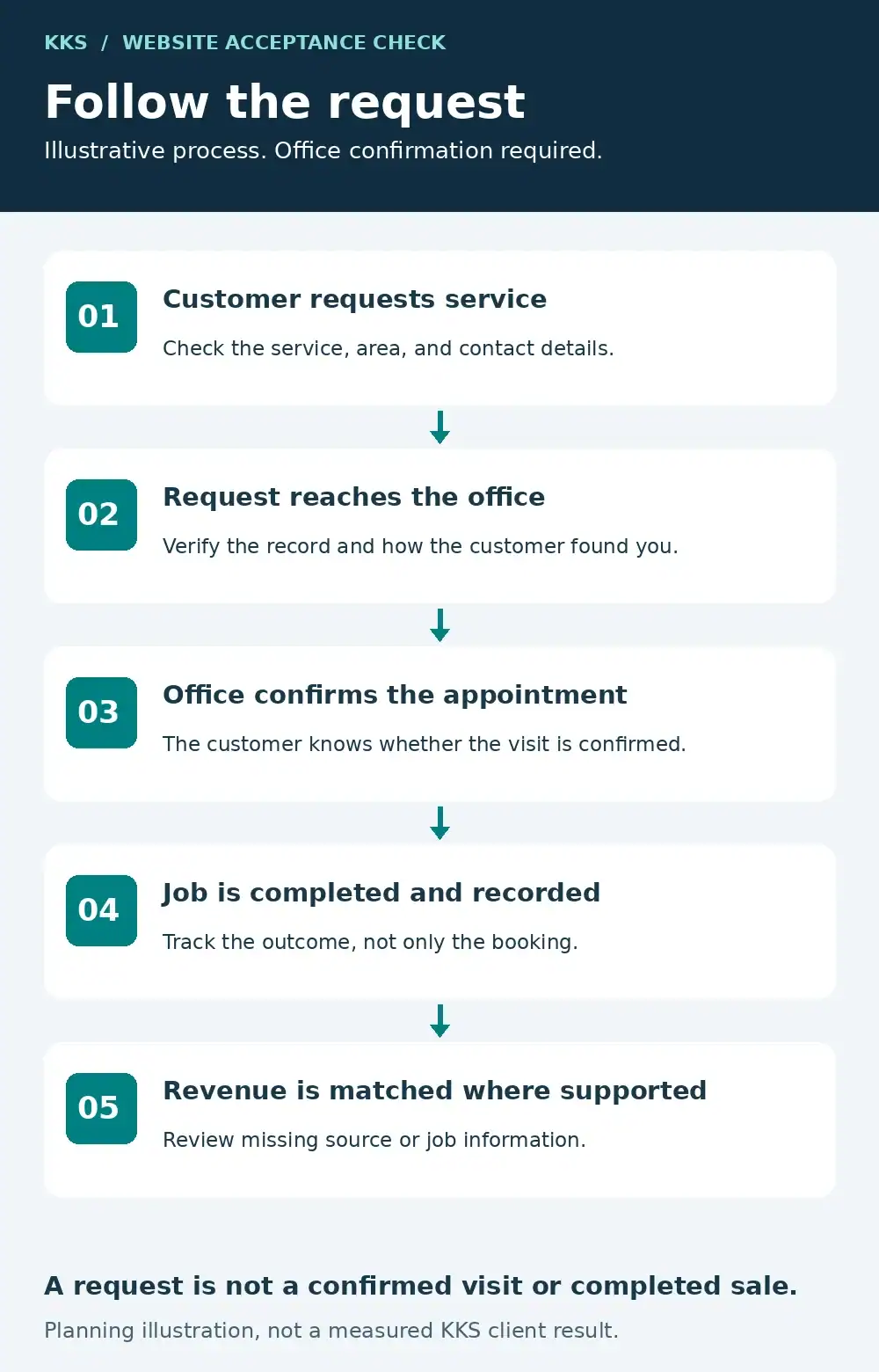
- Customer requests service
Check the service, area, and contact details.
- Request reaches the office
Verify the record and how the customer found you.
- Office confirms the appointment
The customer knows whether the visit is confirmed.
- Job is completed and recorded
Track the outcome, not only the booking.
- Revenue is matched where supported
Review missing source or job information.
The service page should explain the work and offer a clear request button. After submission, the customer should receive wording that matches the process, such as a notice that the office will confirm availability. The office should receive enough information to review the request and respond.
ServiceTitan describes both booked jobs and booking requests, with requests appearing on the Dispatch Board or in Calls > Bookings according to the workflow.[9] Confirm which outcome your setup produces. Do not advertise a confirmed appointment if someone still needs to approve it.
Then follow the same request into your reporting. Check how the customer found you, whether the office accepted the work, and whether the job was completed. Where your systems support it, connect the completed job to collected revenue.
Count calls that connect, inquiries that fit your services, and jobs that are completed as separate outcomes. A button click or booking alone cannot tell you how much work the website brought in. Use the same definitions when comparing reports from the website provider and the office.
What Marketing Pro covers
Marketing Pro includes tools for customer audiences and campaigns. ServiceTitan’s current help guide describes email, SMS, direct mail, and Autopilot campaigns, with separate workflows for Reputation, Ads, and Ads Optimizer.[16]
Do not assume those names describe one universally included package. The same guide says to add Marketing Pro Ads and Marketing Pro Reputation for a more comprehensive package, and it notes that Marketing Pro is available in different packages.[16] Ask for the products and services included in your proposal.
| Area | What the documentation describes | What the owner must settle |
|---|---|---|
| Customer campaigns | Email, SMS, direct mail, audience selection, and Autopilot campaigns.[16] | Audience, offer, timing, customer preferences, and follow-up. |
| SMS setup | Texting registration, chat setup, and access requirements.[16] | Who completes setup and checks opt-in and opt-out handling. |
| Reputation | Review requests, monitoring, responses, and location information.[16] | Package access and who handles customer responses. |
| Ads and reporting | Advertising connections, campaign measurement, and separate Ads Optimizer workflows.[16] | Included products, campaign ownership, tracking setup, and management fees. |
| Website work | A separate provider agreement must define the actual deliverables. | Design, content, maintenance, account ownership, and booking changes. |
Marketing Pro requires the appropriate account permission. Its setup guide also calls for texting registration and chat setup before SMS campaigns can operate as described.[16] Campaign software still needs someone to review customer preferences and the messages being sent.
ServiceTitan has offered a managed-service route as well. A May 2024 company article described its Scorpion partnership and planned website and SEO integrations.[13] That announcement is historical, not a current feature or pricing schedule. Request the present scope if that route appears in your proposal.
The useful question is who does each piece of work. If one provider runs customer campaigns, identify who maintains the landing page. If another manages paid search, identify who can change the booking path and who verifies that source information survives the change.
Before renewing a marketing agreement, use our Marketing Pro and agency responsibility guide to compare automated work, human supervision, reply handling and costs. It includes a responsibility worksheet and a hypothetical handoff example.
How ServiceTitan pricing works
ServiceTitan’s public pricing page describes per-technician pricing and lists Starter, Essentials, and The Works packages. It directs buyers to request pricing rather than publishing a dollar rate for each package.[6]
Treat third-party cost estimates as questions for the sales call, not quotes for your business. Request the base subscription, billable technician definition, additional products, implementation work, usage charges, contract term, and data-export arrangements in writing.
Keep software, advertising, and website management costs separate when comparing the proposals. Ask each provider what it will operate, what it will charge, and what remains your responsibility. This makes overlapping fees and unassigned work easier to spot.
This hub focuses on website decisions rather than estimating your software bill. Use ServiceTitan’s pricing page to request a proposal for your operation.
Judge software fit using your actual work
ServiceTitan lists scheduling, dispatch, call booking, invoicing, and a pricebook among core package features.[6] Its commercial offering also describes service agreements, project management, job costing, and progress billing for specialty contractors.[15]
Ask for a demonstration that follows a real type of job through your office and field process. A residential replacement estimate and a commercial project with progress billing need different demonstrations. ServiceTitan’s commercial FAQ distinguishes specialty subcontractors from general contractors and builders.[15]
Choose the system when the demonstrated benefits justify the full cost and implementation work. Do not substitute a crew-size or revenue cutoff for that review. Name the person responsible for setup, data decisions, and staff training before signing.
Choose the service and market to improve next with our SEO investment guide for ServiceTitan contractors. It includes a priority worksheet, a worked example and checks that separate search visibility from completed jobs.
Review a proposal with our ServiceTitan pricing and complete-cost guide. Compare packages, download the cost worksheet and check implementation, renewal and export terms before signing.
Use our Jobber vs. ServiceTitan comparison to compare packages, run the same demo scenario and plan the records and customer paths that must survive a switch.
Where KKS fits for a ServiceTitan contractor
KKS provides the website and ongoing growth work around your operating software. Our published services include custom WordPress websites, local search work, booking integration, and continuing improvements.[1][2] We do not replace your scheduling, dispatch, or invoicing system.
Consider KKS when you want a contractor-owned website and a named provider responsible for improving it after launch. That work should connect useful service pages with clear calls, forms, or booking paths, then measure what reaches the business. Agree on the ServiceTitan connection and test it with the office before launch.
Our contractor website management service explains the ongoing work. For your proposal, define the actual deliverables: service content, accurate business information, local search improvements, structured data, internal links, and reporting. None guarantees a search ranking, an AI citation, or a volume of leads.
KKS lists paid search and Local Services Ads management as supporting services for managed website clients with working tracking and a clear intake process. Media budgets and third-party charges are separate.[1] Settle the call, form, and follow-up process before adding advertising spend.
Repair a useful website before replacing it
KKS offers an Existing Website Growth Plan for structurally sound WordPress sites, as well as new website packages. The new-build Growth website package is $1,497 setup plus $299 per month.[1] More complex work needs a proposal based on the actual requirements. Existing-site management is a separate plan with its own onboarding and monthly terms; compare the current options on the linked package page.
KKS works with one contractor per agreed service line and market, subject to availability. The service line and territory must be defined together; an inquiry does not reserve them.[1]
Put your website to work alongside ServiceTitan
Bring us your current website, the services and markets you want to grow, and a description of how inquiries reach your office. The proposal should identify what stays, the website work KKS would handle, any separate ServiceTitan account work, and the tests required before launch.
View KKS managed website plans
If you want a diagnosis first, the free KKS audit includes a 15-factor scorecard, comparison with three relevant local competitors, and a sequenced 90-day plan. Qualified reports are delivered within two business days after qualification and scope confirmation. If three defensible competitors cannot be found, KKS resolves the scope before accepting the audit.[3]
Questions contractors ask
Can ServiceTitan work with a WordPress website?
Yes. ServiceTitan publishes Scheduling Pro installation instructions for WordPress using a supplied script and a launch button.[8] Test the office record and source tracking as well as whether the button opens.
Does buying ServiceTitan mean we need a new website?
No. ServiceTitan documents scheduler installation on existing website platforms.[8] Inspect your site’s service information, ownership, and customer contact paths before deciding whether to repair or replace it.
Will a WordPress contact form automatically send information into ServiceTitan?
Installing Scheduling Pro does not connect every other form on your website. A separate form connection needs a supported method, an agreed destination record, and testing. ServiceTitan’s developer documentation is a starting point for that technical review.[18]
Does Marketing Pro replace a website provider?
The product name alone does not define who manages the website. ServiceTitan documents campaigns, Reputation, Ads, and other workflows with package differences.[16] Ask who owns website design, content, maintenance, and search work under the actual agreement.
Is ServiceTitan pricing public?
The pricing page describes per-technician pricing and package features but directs buyers to request dollar rates.[6] Get the full cost and contract terms for your operation in writing.
Can KKS help without replacing our operating software?
Yes. KKS offers managed WordPress websites and booking or CRM integration work.[1] We would review the specific ServiceTitan connection against your product access, permissions, and office process before agreeing to deliver it.
This independent guide uses public ServiceTitan documentation checked on October 23, 2026. KKS sells managed WordPress websites and marketing services, not ServiceTitan software. We have not tested your account or claimed certified partner status; access and setup must be confirmed for each project.
Sources
Public documentation reviewed October 23, 2026. Product availability and contract terms must be confirmed for your account.
[2] KKS contractor website management
[3] KKS contractor website audit
[8] Scheduling Pro website installation
[9] Introducing Scheduling Pro
[10] ServiceTitan contractor website playbook
[13] ServiceTitan Marketing Pro webinar recap (May 2024)