Changing website providers does not inherently require replacing ServiceTitan. Its Scheduling Pro documentation describes installation on WordPress and several other website platforms.[1] Your contracts, subscriptions, account access and ownership of the existing connections determine what can actually move. Plan the booking handoff separately: a new website does not prove that the office receives inquiries or that tracking still works.
If ServiceTitan fits the way your company runs, define what you want the website provider to improve. You may need better service pages, a more reliable inquiry process, or someone who follows through on agreed marketing work. Those needs do not automatically justify changing your operating software.
Before signing a replacement agreement, ask the incoming provider to identify what will stay, what will change, and how the office will verify the result. This is a website handoff, not a migration of ServiceTitan customer records or a replacement of your operating account. For the broader relationship between the systems, read our ServiceTitan and WordPress guide.
| What stays in a website-only change | What may change |
|---|---|
| Your ServiceTitan operating account and existing business records remain in place. | The website provider, hosting, design or management agreement may change. |
| Your office still decides how to handle requests. | Website buttons, forms, phone routes and customer wording may need new setup and tests. |
| Account-authorized staff retain control of ServiceTitan settings. | Installation method, permitted website addresses and source tracking may need review.[1] |
The precise split belongs in the proposal. Do not assume a connection owned by the outgoing provider will transfer with the website.
Decide whether to keep, repair or rebuild the website
Start with the work you want more of and what prevents the current website from supporting it. A new design may help explain your services, but it cannot settle an ownership dispute or prove that a booking request reached the right person.
| What you find | A sensible starting point |
|---|---|
| The website explains your services and delivers usable inquiries, but updates and reporting are neglected. | Review a management change before commissioning a replacement site. |
| Service pages are useful, but a form or booking path fails. | Diagnose that path and compare a focused repair with the cost of rebuilding. |
| The website cannot support the content, editing or customer experience you need. | Price a rebuild that preserves useful assets and includes replacement connections. |
| Access, transfer rights or integration ownership are unclear. | Resolve those dependencies before agreeing to a launch or cancellation date. |
These are planning recommendations, not findings about your current provider. Put the reason for the change in the proposal so you can judge whether the work addresses it.
Considering a change without replacing everything?
KKS offers ongoing work for suitable existing WordPress websites as well as new builds.[8] We can review the site you have, the services you want to grow and the inquiry paths that matter. A proposal should say which website work KKS would handle, what can be preserved, and which connections need account-authorized review.
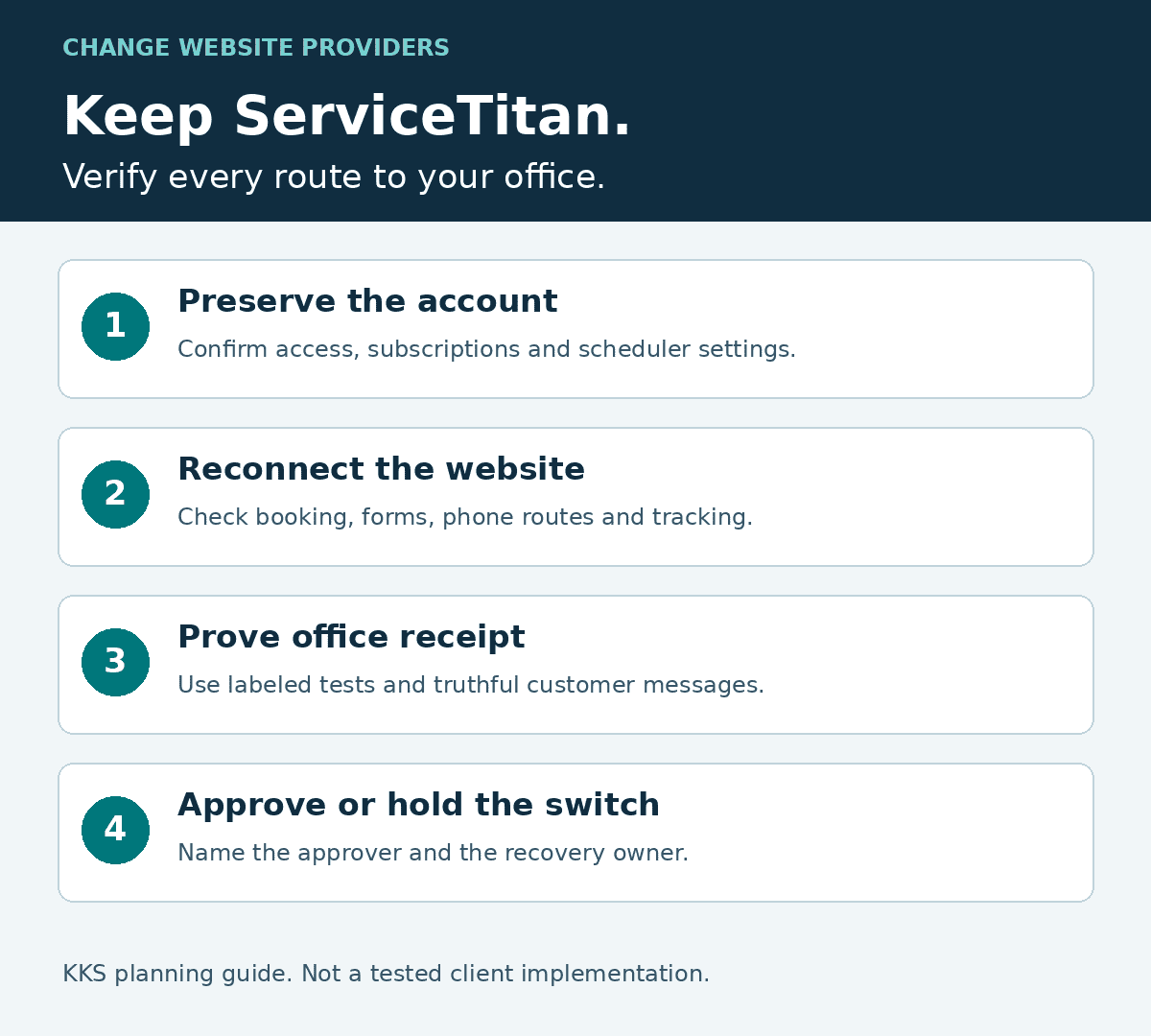
KKS planning guide, not a tested implementation.
Keep the ServiceTitan account separate from the website handoff
ServiceTitan’s Scheduling Pro installation guide describes a script supplied through onboarding and a customer-facing button that launches the scheduler. It also identifies account preparation such as service zones, job types, business hours, campaigns, a Scheduling Pro tag and the displayed phone number.[1]
That gives an incoming website provider a documented installation route. It does not give them authority to change your scheduling rules or access to every product in your account.
Ask your authorized ServiceTitan administrator to confirm which scheduler and version you use, who controls its settings, and who can provide the current installation instructions. ServiceTitan notes that the newer Scheduling Pro runs on a separate platform from its previous version; existing customers should speak with their Pro Product Specialist about moving to it.[1]
Treat a scheduler upgrade as a separate decision from changing website providers. If the proposal includes both, ask why both changes are necessary and how each will be tested. For a website-only project, record the operating account, office duties and business records that remain in place. Exporting customer history or replacing the operating system calls for a different project scope.
Map every route from the website to your office
Have the incoming provider prepare the inventory with your office. You should not need to locate scripts or reconstruct technical settings yourself. Confirm what customers should be able to request and who will respond.
Use a handoff record for your actual account, not a presumed list of ServiceTitan features. Keep passwords and secret credentials out of it. Record the account owner and use an approved access method when technical work requires credentials. Use the blank handoff worksheet to record your own connections and results.
| Connection to inspect | What the handoff should record | Evidence to require before approval |
|---|---|---|
| Scheduling Pro button | Current installation method, scheduler owner, permitted website addresses and launch buttons. | The intended scheduler opens on the replacement website and an authorized test reaches the expected office destination. |
| Ordinary contact or estimate form | Fields, receiving inbox or system, notification method and person responsible. | A labeled test reaches the actual recipient with the expected service and contact information. |
| Custom automation or API connection | Sending and receiving systems, account owner, supported action, ongoing fees and maintenance responsibility. | The agreed record is created or updated once, and the failure-handling process is documented. |
| Customer-facing phone numbers | Number provider, routing, account control and any transfer requirements. | Calls reach the intended destination; any required transfer is confirmed before the old service closes. |
| Campaign and source information | Current source fields, tracking tools, tags and reporting owner. | The agreed source information appears on the test inquiry or in the designated report. |
| Customer acknowledgment | Whether the message promises a confirmed visit or says the office will respond. | The wording matches what the office actually commits to doing. |
A working booking button does not establish that a separate contact form works. The documented Scheduling Pro installation concerns that scheduler.[1] Test each path on its own. If an automation belongs to the departing agency, determine whether it transfers, needs replacement or continues under a separate agreement before building a new form around it.
Confirm who controls the website and its connections
Your company needs a usable handoff, not merely a list of login names. Ask the incoming provider to distinguish account access from contractual rights and technical portability.
Use our contractor website ownership questions for the broader review of domains, content, advertising accounts and licenses. For this project, attach a short schedule of the website components and ServiceTitan connections that will survive the change.
A WordPress backup needs both the database and the site files; WordPress documents them as separate parts of the backup process.[14] Ask the incoming provider to restore and test the copy rather than treating receipt of a file as completion. If you receive only page exports, ask what still has to be rebuilt.
For any provider-managed service, get a written answer about cancellation, continuing charges and replacement responsibility. If ownership is disputed, resolve the contract question with the appropriate adviser. A technical checklist cannot determine legal rights under an agreement it has not reviewed.
Preserve useful pages and test the replacement before switching
Keep your domain and useful page addresses unless there is a specific reason to change them. Google distinguishes a hosting change that preserves visible URLs from a migration that changes those URLs.[2][3] Those are different technical jobs, even when both are described as a website move.
For a hosting change, Google recommends copying and testing the website before changing DNS, the settings that direct visitors to the hosting service. Its testing guidance includes pages, images, forms and downloads.[2] Ask the provider to preserve other services connected through your domain, including email.
Where page addresses must change, require a map from old URLs to relevant new destinations. Google recommends preparing that mapping and warns against redirecting many old URLs to an irrelevant destination such as the homepage.[3] It also advises changing one major thing at a time and explains that significant site changes can cause temporary ranking fluctuations.[3] Ask what the provider will preserve and monitor, rather than accepting a promise that rankings cannot move.
Our agency-exit checklist covers the broader migration sequence. Add these ServiceTitan checks:
- Obtain the current account-specific scheduler instructions rather than copying code from another contractor’s site.
- Confirm that the intended website addresses are permitted in Scheduling Pro. ServiceTitan recommends including both the www and non-www versions.[1]
- Have the account administrator confirm how a staging address will be handled before testing the replacement website.
- Review every booking button, estimate form and phone route on both a phone and a desktop browser.
- Arrange authorized test submissions with the office, label them as tests, and exclude them from business-performance reporting.
If the provider proposes replacing an embedded scheduler with a hosted link, review measurement as well as appearance. ServiceTitan warns that its Quick Install option can affect detailed attribution data.[1] A shorter installation may lose information your business relies on.
Let the office reject a failed handoff
The person receiving inquiries should participate before the website goes live. They know whether a request contains enough information to act on and whether the customer has been promised something the business cannot deliver.
Consider an illustrative HVAC company that wants replacement estimates but does not confirm visits automatically. Its proposed website has an estimate-request button. The record below shows a proposed acceptance test, not a test run or a customer result.
| Illustrative acceptance record | Proposed entry |
|---|---|
| Path and responsible testers | Replacement estimate form; incoming provider submits a labeled test with the office representative observing receipt. |
| Fields to check | Test contact details, replacement-estimate request, service area and any required callback details. Use approved test data, not a customer’s information. |
| Expected destination and notice | The office’s designated receiving inbox or system, as named by that office. Verify the notification with the person who handles it. |
| Customer wording | “The office will respond,” not a claim that a visit is confirmed. |
| Source and duplicate check | Record the expected campaign or source marker if the agreed form carries one. Check whether one submission creates one office item, and document what the office should do if a duplicate appears. |
| Result and release decision | Pending. Enter the observed receipt, missing fields, actual customer message, duplicate result, tester names and decision after an authorized test. Hold launch if a required check fails. |
A website success message alone would not pass this test. The office must see a usable request and the homeowner must see wording that matches the actual response process. This example does not demonstrate a working integration in any real account.
Assign people before the transition:
| Participant | Decision or responsibility |
|---|---|
| Business owner | Desired services and markets, budget, provider scope and final business approval. |
| Incoming website provider | Website inventory, agreed implementation, documented tests and technical recovery plan. |
| Authorized ServiceTitan administrator or specialist | Product access, scheduler settings and changes requiring account authority. |
| Office representative | Receiving destination, usable inquiry details, response process and customer wording. |
| Outgoing provider | Deliverables, access and transition duties established by the existing agreement. |
Use actual names in your project record. If KKS is the incoming provider, our proposal should identify the work we accept and what requires your team or a specialist. Set that division before a booking test fails.
Decide when to launch and who can reverse the change
Use these checks for the final decision, with actual names and evidence recorded in your project handoff:
- Launch only after the replacement site and required inquiry paths have been tested on phone and desktop, the office confirms receipt and customer wording, account access is verified, and the owner approves the change.
- Hold if a required connection, transfer right, notification, phone route or recovery step is unresolved. Keep the old service available as the agreement and technical plan allow; do not cancel it solely because a launch date was chosen.
- Name the incoming provider’s technical lead for reverting website or DNS changes, the authorized administrator for scheduler settings, and the office contact for checking inquiries during recovery. Agree on the trigger and contact method before switching.
After the switch, repeat customer-contact tests on the public website. Confirm that the office receives requests and measurement uses the intended accounts. Google recommends monitoring both hosting environments and shutting down the old hosting only after the new infrastructure serves users and Googlebot correctly.[2] Coordinate that checkpoint with the contract notice period and other services being retired.
Once the handoff is stable, choose the first growth priority. You might improve a neglected service page, explain a higher-value service more clearly or repair a weak inquiry path. Track suitable inquiries and the work they become separately from visits and button clicks. Choose the work from evidence about your business, not from the new design alone.
Questions owners ask before switching
Can I keep ServiceTitan if I change website agencies?
Changing website agencies does not inherently require a new ServiceTitan account. Confirm your contract and subscription terms, authorized account access and who owns each website connection. Have the new provider test the required paths with your office before canceling the old service.[1]
Is a working Scheduling Pro button enough to approve the site?
No. Scheduling Pro has its own installation route.[1] A separate estimate form, phone number or custom automation can fail independently. Check the customer’s message and the office’s actual receipt for each required path.
Should I change my domain or page addresses during the move?
Keep useful addresses if the new site can support them. If addresses must change, map each old page to a relevant new page and test the redirects. Google treats a hosting change without URL changes differently from a move that changes URLs.[2][3]
Build on the software that fits your business
KKS offers managed WordPress websites and improvements to suitable existing sites.[8] Bring us the site you have, the services you want to grow and a description of how inquiries reach your office. We can review whether focused repairs, ongoing management or a rebuild fits the website problem. A proposal can name the website work we would perform and the ServiceTitan access or specialist decisions that remain with your team.
KKS sells website and marketing services. This independent guide uses public documentation checked October 24, 2026; it is not a certified-partner claim or a report of a tested implementation in your account.
Sources
[1] ServiceTitan: install Scheduling Pro
[2] Google: change hosting without changing URLs
[3] Google: site moves with URL changes