To verify ServiceTitan booking and lead capture, trace an approved website test through to the office. Have your provider and receiving employee check the same submission before accepting the work. Scheduling Pro can create a job or send a request for office confirmation.[12] Check the record type, the staff alert and the customer’s message. A time on screen does not prove an appointment was booked.
If the office gets the request but the message promises a booked visit, fix the wording. If no usable record arrives, trace the connection. If a job arrives without an alert, fix the response process before driving more traffic to that path.
Quick acceptance check
- Match the test submission to the receiving record and confirm whether it is a request, lead or job.
- Have the responsible employee verify the alert and the fields needed to respond.
- Compare the customer’s screen and follow-up message with what the office can actually honor.
Jump to the symptom: No record · Wrong time offered · No staff alert · Wrong customer promise · Missing campaign.
Where does the inquiry go?
A completed Scheduling Pro request may go to Calls > Bookings for office review or become a job, depending on the saved setting.[12] An unfinished session can become an abandoned booking or lead if that option is enabled; staff can also log a follow-up lead from a booking.[12][4] Bookings can appear in the Unassigned Job Tray too, so verify the record type rather than relying on the screen location.[17] An ordinary contact form has its own destination and must be checked separately.[6]
Decide what the customer should be able to do
The following decisions are KKS recommendations. Your account administrator should confirm the product, version and settings before the website provider changes a live customer path.
| Intended customer action | Office acceptance requirement | Suitable customer wording |
|---|---|---|
| Request a callback or estimate | A usable inquiry reaches a named receiving destination and someone owns the response. | Request received; the office will contact you. |
| Request an appointment window | The office receives the requested time and reviews it before confirming. | Appointment requested; your visit is not confirmed yet. |
| Book an available appointment | The configured workflow creates the expected job and the office can honor the offered window. | Appointment booked, with the actual date, arrival window and change instructions. |
| Leave an unfinished scheduler session | Staff can distinguish an abandoned session from a completed request. | Do not send a completed-booking promise for an unfinished session. |
Use the label that matches the actual process. A replacement estimate request and a booked diagnostic visit should not share an unconditional “You’re booked” message simply because both began on the website.
Need to repair the connection rather than replace the website?
KKS offers a Booking and CRM Integration Sprint covering form routing, online booking, immediate-response workflow and submission testing.[15] Start with the path that fails and the outcome your office needs. Account access, supported features and any specialist development belong in the agreed scope before work begins.
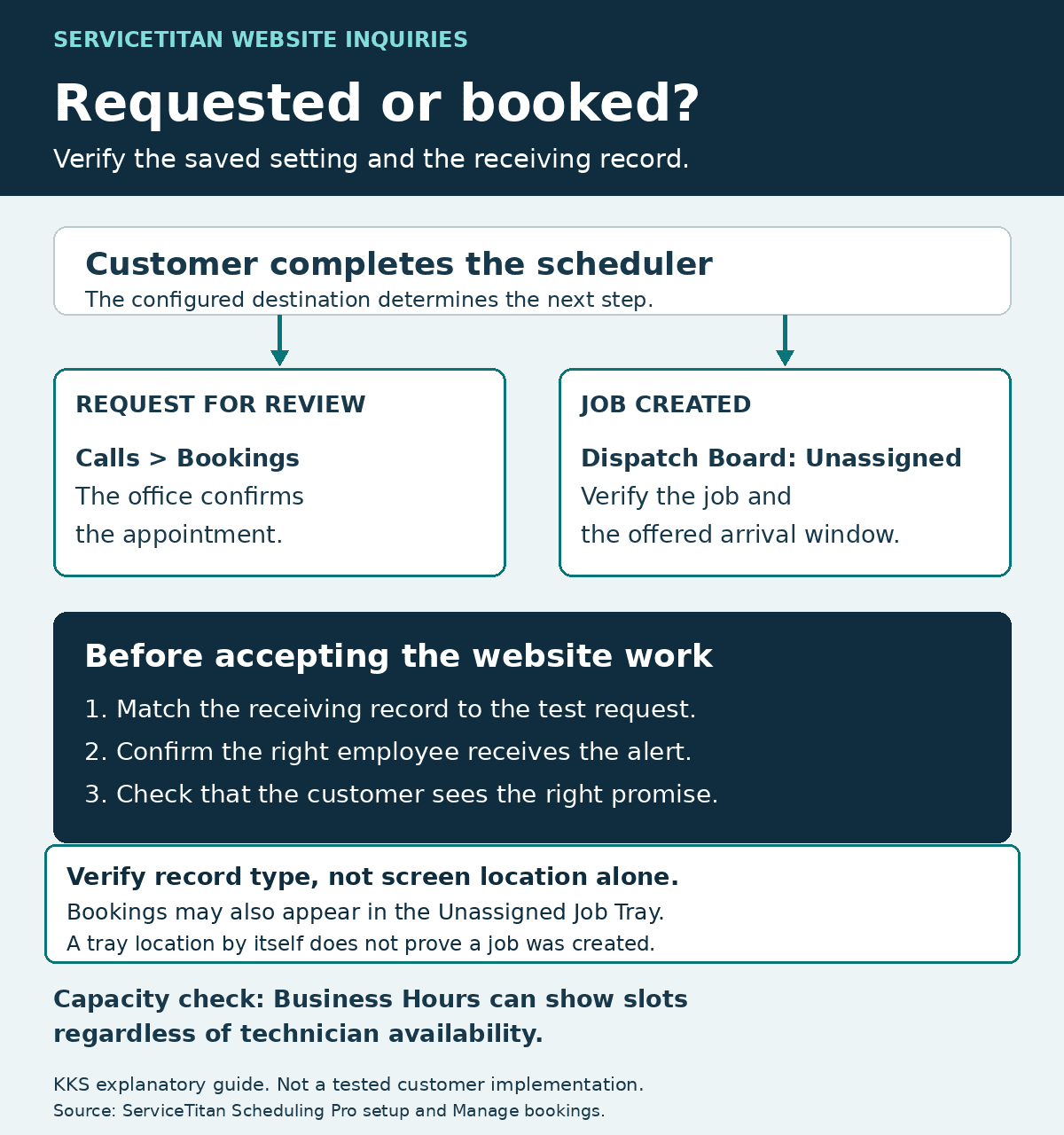
KKS explanatory guide, not a tested client result. Job and request settings; Job Tray; capacity. Open the full diagram.
Identify the ServiceTitan path before choosing a fix
ServiceTitan’s older Web Appointment Scheduler and newer Scheduling Pro should not be treated as interchangeable instructions. The legacy scheduler sends appointment requests to Bookings for customer service representatives to turn into jobs.[1] Scheduling Pro’s onboarding documentation describes the choice between sending appointments as jobs to the Dispatch Board and sending them to Calls > Bookings for manual confirmation.[12]
Have the administrator show the saved setting and the office verify the receiving record. A label on a proposal cannot tell you what this account does.
An ordinary website contact form needs its own receiving arrangement. ServiceTitan’s web-form attribution guide describes separate Zapier and developer-built API routes; its Zapier instructions assume Marketing Pro Ads and a paid Zapier subscription.[6] Treat that document as evidence of a connection method, not proof that every subscription includes it or that an existing WordPress form already uses it. Confirm current account eligibility, the supported action and any additional charges before commissioning the connection.
| Path to identify | What to record before testing |
|---|---|
| Legacy Web Appointment Scheduler | Legacy product identity, receiving Bookings queue, office follow-up and request acknowledgment. |
| Scheduling Pro | Current version, saved job-versus-request setting, capacity method, receiving location and alert configuration. |
| Ordinary contact or estimate form | Form name, receiving inbox or system, responsible staff member and whether ServiceTitan entry is manual or automated. |
| Separate automation or API connection | Maintainer, supported receiving record, field mapping, error notice, retry handling and ongoing subscription costs. |
For the broader website relationship and installation options, use our ServiceTitan and WordPress guide. This article concerns what happens after a customer starts a request, not where to paste the scheduler script.
Check capacity before promising an appointment
Scheduling Pro currently lists four capacity choices: Adaptive Capacity, Adjustable Capacity Planning (ACP), Business Hours and Custom Capacity.[18] Business Hours can show slots regardless of technician availability; ACP pulls real-time capacity for the assigned business unit or group.[7] These are different commitments. Have the administrator identify the chosen method, then review service eligibility, appointment windows, buffers and blocked dates with the office. The website provider should not set operating rules on the contractor’s behalf.
Test a time the office expects to offer and a time it expects to reject. If both appear bookable, resolve the configuration or change the customer promise before accepting that path. For urgent requests, display the real response hours and a monitored phone route. An online request should not imply emergency dispatch when nobody is available to respond.
Agree on the information the office needs
Ask the receiving employee to define the next action before removing fields. A callback may need only enough information to contact the person and identify the service. A scheduled visit also needs the information your selected workflow requires to identify the property and appointment. There is no useful universal field count for these different commitments.
Use this mapping as a starting point for the provider’s acceptance record. These are recommended checks, not a ServiceTitan API specification or permission to remove required product fields.
| Information | Receiving check |
|---|---|
| Customer name and supported contact method | The office can identify and contact the test person through the agreed channel. |
| Service or reason for the request | The receiving record preserves the selected service or useful description. |
| Property or service area | Location information supports the next decision; a ZIP code alone is not treated as a verified street address. |
| Requested or booked time | The record and customer message agree on the date, arrival window and whether office confirmation remains necessary. |
| Request identity | A submission identifier or other agreed reference lets the team match the website event to the receiving record. |
| Source information | The agreed campaign, landing page or tracking fields survive the connection where supported. |
| Response and marketing preferences | Staff can distinguish permission to respond to the request from a separate marketing choice. |
The website provider should document where each field goes and how missing information is handled. If the integration requires a field the form does not collect, resolve that mismatch rather than inserting invented customer data. Keep passwords, API secrets and private customer details out of the worksheet.
Our contractor contact-form guide covers general field selection, accessibility and spam checks. Here, the additional test is whether the agreed information reaches the correct ServiceTitan record or other declared destination.
Verify the office alert separately from the record
ServiceTitan documents separate Booked Job and Booking Request Received alert types for Scheduling Pro. Its notification guide describes creating a tag, configuring an alert and assigning the tag in the scheduler.[13] Ask the administrator to review the alert appropriate to each active path, including recipients and delivery method.
A record can exist while the person responsible for responding remains unaware of it. Conversely, a form email can arrive without proving that a ServiceTitan record was created. Require both pieces of evidence when the agreed workflow includes both.
Assign a named employee to confirm that the notification arrived and that its record contains enough information to act. Set an acknowledgment deadline the office can meet, including after-hours handling. Record a backup contact and the escalation method for an unacknowledged request. Do not copy a response-time promise from another contractor’s website.
Make confirmation wording match the commitment
The legacy scheduler’s confirmation email acknowledges the customer’s request, rather than an action taken by the company.[1] Scheduling Pro also provides editable confirmation-page messaging.[7] Review the actual screen and any customer email or text, not just the website button.
For a request awaiting review, suggested wording is: “We received your appointment request. Your visit is not confirmed yet. Our office will contact you to confirm availability.” Add a response expectation only after the office approves it.
For a genuinely booked appointment, show the actual appointment details and explain how the customer can request a change. Do not turn a requested time into a confirmed appointment through wording alone. The message must agree with the receiving record and the contractor’s operating process.
Separate unfinished sessions, follow-up leads and duplicates
The onboarding guide allows abandoned sessions to be sent as bookings or leads, depending on settings.[12] Check their origin before counting them as completed requests. Use the approved permission and contact process for follow-up.
A different issue arises when the office receives a booking request but cannot yet turn it into a job. ServiceTitan documents capturing a lead from a booking when the account is configured for it; that process requires a call reason classified as a Lead.[4] The guide warns that omitting Log a Follow Up leaves the lead in Dismissed status rather than the normal Follow Up > Leads queue.[4]
Have the office find a request that needs follow-up in its working queue.
Duplicate customer records require a separate check from duplicate submissions. ServiceTitan documents matching returning customers by phone number and explains how a different household number can create another customer record.[16] Its location-takeover setting can associate the booking with the existing customer at that address, but the guide warns that customer notifications can then go to that existing customer.[16]
Do not enable that setting merely to reduce the duplicate count. Have the authorized administrator review customer identity and notification consequences. For an automation retry, the technical maintainer should instead check whether the same submission creates more than one actionable item. Those are different problems with different owners.
Test source tracking without confusing it with job revenue
ServiceTitan’s Scheduling Pro documentation describes a Direct Web Traffic fallback when Marketing Pro attribution finds no match.[7] That fallback label does not, by itself, establish that the customer arrived through organic search. Preserve the difference between an observed source and a default assignment.
Have the marketing owner supply an approved test URL and the expected campaign result. The website provider should check that the relevant information survives the actual path, including redirects, and the office should confirm the resulting record or designated report. Record missing values instead of guessing them.
The documentation needs care here. The advanced-settings guide lists se-campaign, while the separate attribution guide lists sp-campaign; both also show campaign.[7][8] Have the installer confirm the supported syntax for your account and version rather than copying a parameter from this article. The advanced-settings guide also says its Marketing Campaign Rules are unavailable when Marketing Pro Ads integration is enabled.[7]
Keep website clicks, accepted requests, booked jobs, completed work and collected revenue separate. A campaign value on a test record establishes a tracking result for that test, not a sale or proof that the website caused additional revenue.
Run the receiving test with the office
Use the blank booking and lead-capture worksheet. It is a planning tool with unexecuted scenarios, not a completed implementation test. Duplicate the relevant rows for each real form or scheduler path and for phone and desktop testing.
Before submitting anything, obtain account-owner approval, choose a controlled test window and arrange approved test contact details. The administrator should confirm the permitted test environment and cleanup method. Do not test another contractor’s live form or trigger a real dispatch, customer notification or payment merely to inspect a connection.
| Proposed scenario | Evidence to retain | Hold the change if |
|---|---|---|
| Eligible service and location | Matching receiving record, required fields, actual customer message and staff acknowledgment. | The record is missing, unusable or contradicts the customer promise. |
| Excluded service or location | The customer sees the intended rejection or alternate contact route. | The system accepts work the office cannot fulfill without explaining that review is required. |
| Unavailable time or after-hours request | Offered windows and response wording match the approved operating rules. | The path promises availability or a response the team cannot provide. |
| Missing field or corrected input | A usable error message appears and the corrected submission reaches the office. | The customer sees success for a rejected request. |
| Approved repeat or retry test | The maintainer accounts for every resulting item and verifies the duplicate-handling rule. | Staff cannot tell whether the items represent one request or separate work. |
| Returning-customer test record | Correct customer/location association and intended notification recipient. | The test attaches to the wrong person or sends a message to an unintended recipient. |
| Campaign-marked test | Expected source information appears in the agreed record or report. | Required attribution is lost or a default is presented as a verified source. |
| Abandoned session, if enabled | The office can recognize its incomplete status and apply the approved follow-up process. | It becomes a confirmed appointment or a completed-booking count without that event occurring. |
| Controlled failure, where safely supported | Error notice, maintainer alert, recovery route and subsequent reconciliation. | A success message hides a failed delivery or a retry creates unexplained duplicates. |
For failures, use a test environment or a safe simulation approved by the maintainer. Do not disconnect production to make a test. If the failure cannot be exercised safely, review the alert and recovery settings and record the test as unrun. ServiceTitan’s Scheduling Pro setup guide describes its scheduler test and preview; eligible accounts can ask their success manager or onboarder about sandbox activation.[18] The Manage bookings instructions show how the office handles a request.[17] Follow your account’s permitted route and avoid real dispatch or customer notifications.
Example: record a failed receiving test
This hypothetical example shows selected fields from one worksheet row. KKS did not run this test. The blank download remains unexecuted; use real approved test details and evidence when completing your own copy.
| Worksheet field | Illustrative entry |
|---|---|
| Scenario | Eligible service and location. |
| Expected record type and destination | Booking request in Calls > Bookings, pending office review. |
| Approved customer promise | Appointment requested; the office will confirm availability. |
| Observed record reference and receipt time | Request appears in the intended queue. In a real test, add its reference and receipt time. |
| Observed staff alert and acknowledgment | No alert received within the approved test window. |
| Observed customer message | Appointment booked. |
| Result | FAIL: the message promises a confirmed visit and the expected alert is missing. |
| Failure owner and correction | Website provider corrects the message. Administrator checks the Booking Request Received alert. |
| Retest reference | NOT RUN. The office must witness a new controlled test after the corrections. |
| Acceptance decision and approver | HOLD pending a successful retest and the named approver’s decision. |
The failed result does not prove that the whole website needs replacing. It identifies the wording and alert checks that must be resolved before accepting this path.
Name who fixes each failure
| Responsible party | Work to own |
|---|---|
| Business owner | Approve the customer commitment, operating constraints, budget and final acceptance. |
| Website provider | Inventory the paths, implement agreed website changes, preserve field mappings and retain test evidence. |
| Authorized ServiceTitan administrator | Confirm product access, version, capacity, record destination, tags and alert settings. |
| Integration maintainer or specialist | Verify supported actions, permissions, error handling, retries and ongoing maintenance for separate automations. |
| Office representative | Verify receipt, usable information, staff alerts, customer wording and follow-up ownership. |
| Marketing/reporting owner | Define source expectations and exclude test activity from business-performance reporting. |
The contractor should approve the outcome, not reconstruct the connection. Put actual names beside these responsibilities, including the person who can pause a failing path and restore the last known working arrangement. Keep a tested, monitored alternative contact route available during an authorized repair.
Put the repair in writing
KKS publishes the Booking and CRM Integration Sprint at $750 to $1,500 one time. It also offers an Existing Website Growth Plan at $750 onboarding plus $349 per month for suitable existing WordPress sites.[15] These are different scopes, not a requirement to buy a replacement website or a promise that any custom integration fits the advertised sprint.
Bring the website address, the path causing trouble and a description of what the office receives. We can discuss the website work KKS would take responsibility for and the account-authorized or specialist work it depends on. Confirm service-line and market availability before treating an inquiry as a territory reservation.
If the connection problem is part of an agency transition, use our separate guide to changing website providers while keeping ServiceTitan.
Questions about ServiceTitan website inquiries
Does a ServiceTitan booking always mean an appointment is confirmed?
No. Scheduling Pro can send appointments as jobs to the Dispatch Board or as requests to Calls > Bookings for manual confirmation.[12] Check the saved setting and the actual receiving record before choosing customer confirmation wording.
Does installing Scheduling Pro connect my ordinary contact form?
Do not assume it does. ServiceTitan documents separate web-form connection methods through Zapier or a developer-built API integration.[6] Identify the form’s actual destination, supported action and maintainer, then test that path separately from the scheduler.
Can an available time appear without checking technician capacity?
Yes. Scheduling Pro’s documented Business Hours capacity option shows slots regardless of technician availability.[7] Have the administrator confirm the selected capacity method before promising that the displayed window reflects staffing availability.
What proves the website inquiry reached the office?
For the agreed workflow, retain the matching receiving record, usable fields, staff notification and office acknowledgment. Check the customer’s message against that result. A thank-you screen alone does not establish receipt or a confirmed appointment.
About this guide
Documentation and public KKS service terms were reviewed October 24, 2026. The testing framework is KKS analysis; no customer account was accessed and no integration or measured client outcome was tested for this article. KKS sells website and marketing services. This guide does not claim ServiceTitan certification or partnership. Product access and account-specific behavior require verification with the authorized administrator or ServiceTitan.
Sources
[1] Set up the Web Appointment Scheduler (Legacy)
[4] Capture a lead from a booking – Capture Leads and convert them to jobs
[6] Web Form Attribution – Marketing Pro Ads Setup Guide
[8] Track lead attribution and Scheduling Pro jobs
[13] Set up job-booking notifications for Scheduling Pro
[15] Contractor Websites That Bring In Leads | Kore Komfort Solutions
[16] Confirm existing contact information – Detailed feature setup