Marketing Pro can replace some routine campaign work, but it does not decide who should supervise it, handle exceptions or maintain your website. Whether you still need an agency depends on the automation enabled in your account and the work your agency actually performs. ServiceTitan offers campaign templates and Autopilot recommendations.[1][9] Its SMS agent and separately promoted Scorpion managed services change which routine tasks or outside help you need.[8][10]
Before renewing an agency agreement or adding Marketing Pro, compare the work each purchase covers. Keep the software and services that solve a defined problem. Remove duplicated charges only when a named person accepts the remaining work.
This guide helps you decide who should supervise campaigns, maintain the website, handle exceptions and explain results. For the broader website decision, start with our ServiceTitan guide for contractors.
Decide whether you need software, an operator or a different scope
Use the following situations to frame the conversation with your provider. These are recommended decisions, not promises about a particular account or contract.
| Your situation | Recommended next move | Evidence to request |
|---|---|---|
| A capable employee already plans campaigns and reviews results | Check whether available automation can support that employee before buying another management service | A campaign plan, access check and named backup |
| You own Marketing Pro but nobody operates it consistently | Compare an internal assignment with a separately scoped managed service | Named operator, deliverables, review schedule and approval process |
| Your agency already runs campaigns in Marketing Pro | Identify what its fee buys beyond access to the software | Audience work, creative, testing, monitoring and reporting records |
| Your main problem is the website or missing inquiries | Scope website and receiving-path repairs separately from campaign management | Page inventory, approved changes and an office receiving test |
| Several providers claim the same revenue | Reconcile campaign definitions and job records before changing the budget | Reporting period, attribution rules, costs and duplicate checks |
The decision is about management work that remains after routine execution. Someone still chooses the offer, checks permission and message quality, watches replies and costs, and decides when to stop or change a campaign.
If the gap is your website, KKS can discuss an existing-site improvement plan or a replacement when the site warrants it. That discussion is separate from assuming we will manage your Marketing Pro account.
Discuss your website and current KKS options
What Marketing Pro can handle
Marketing Pro’s product page describes targeted audiences, campaign automation, prebuilt templates, review requests and a consolidated feed for reviews and listings.[1]
The current Marketing Pro v2 documentation covers Autopilot, one-time campaigns, automated campaigns and tracking campaigns. It also directs readers to Ads, Reputation and Ads Optimizer workflows.[2]
Autopilot matters to the agency decision. ServiceTitan describes recommendations based on customer data and campaign templates that reduce setup work. Its announcement explicitly presents Autopilot as an option that does not require outsourced campaign management or additional staff.[9]
That makes an agency fee worth examining, not automatically wasteful. Ask the provider to show which decisions, changes and checks it performs for your business. If its proposal mostly repeats tasks your employee can already handle with the available tools, compare a narrower assignment before signing another full retainer.
Automation belongs in that comparison. Ask whether your account already handles the routine task a provider proposes to do manually. A recommended campaign still needs someone to check the service area, offer and appointment capacity before approval.
SMS agents can change the handoff
ServiceTitan says Marketing Pro includes an SMS agent for customer communication. Its AI page describes inbound text responses, outbound follow-up, unsold-estimate outreach, adjustable messages and timing, and handoffs to manual tasks. It describes Voice-capable AI Virtual Agent as an additional agent, not an included Marketing Pro feature.[10]
Check the signed order, account version, eligible channels and permissions before assigning automated work. Ask the administrator which agent and workflows are actually enabled at each location. Ask the campaign operator to review messages and conversations, set a human escalation contact, and record when an inquiry leaves the automated path. Vendor descriptions are capabilities, not proof of reliable responses or booked jobs in your account.[10]
Confirm your package before comparing features
ServiceTitan’s public documentation does not give one consistent package answer. The v2 hub and Marketing FAQ describe Ads and Reputation as additions. The Reputation FAQ instead describes Marketing Pro as a package containing three components.[2][3][4]
Ask your administrator and ServiceTitan Customer Success Manager or Pro Account Manager to confirm the version and licensed features in your actual account. Keep their written answer with the signed order. Include locations, user permissions, usage charges and any separate services in the comparison.
Do not treat a product-page feature list as proof that every location has access to it. ServiceTitan’s Reputation FAQ notes that additional listing addresses can involve extra costs.[4]
Managed services are a separate buying decision
ServiceTitan promotes Scorpion managed services for Marketing Pro users, including campaign assistance, custom strategy, content and hands-on support. This is a documented service route alongside the software, not evidence that every Marketing Pro subscription includes agency work.[8]
Other agencies can use Marketing Pro too. ServiceTitan’s FAQ describes creating an office-employee user account for an agency and granting the Marketing Pro module permission.[3]
Compare providers on the work they agree to perform and the access they need. Ask for a written scope that distinguishes campaign operation from website changes, search advertising, content production and office follow-up. A provider can own several of these jobs, but the agreement should say so.
Be careful with older announcements. The Scorpion article describes some services as available and other integrations as coming soon. Those roadmap statements do not establish what is available in your account today.[8]

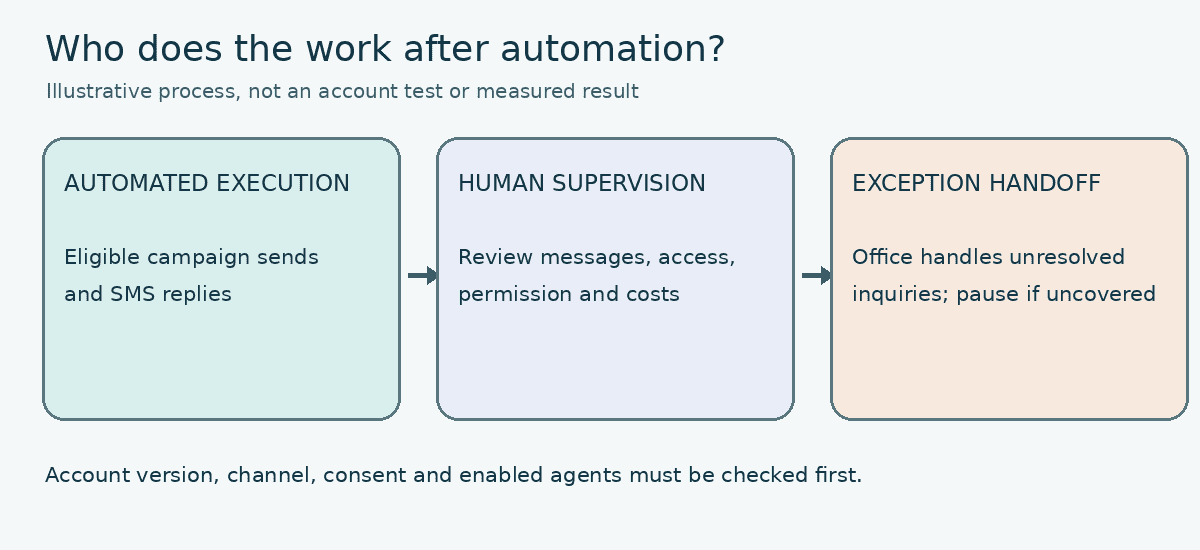
Eligible sends and SMS replies, if enabled and permitted.
Review messages, access, permission and costs.
The office handles unresolved inquiries. Pause if nobody covers them.
Assign the work before approving another fee
Use this map as a starting point. Replace each role with an actual person or contracted provider who accepts the work.
| Work to assign | Who could do it | What to check |
|---|---|---|
| Confirm software version, channels, agents and locations | Account admin with ServiceTitan contact | Written feature list matched to the order and enabled settings |
| Choose target services, offers and spending limits | Owner with marketing lead | Approved brief and budget |
| Prepare customer groups and exclusions | Marketer with account admin | Audience rules and reviewed sample records |
| Run routine sends and eligible SMS responses | Enabled Marketing Pro workflow, supervised by the marketer | Approved message and timing, test record, conversation review and stop rule |
| Review campaigns and handle exceptions | Marketer or contracted provider, with an office backup | Monitoring log, named escalation contact and unresolved-message queue |
| Monitor reviews and prepare responses | Assigned employee or provider | Response rules and escalation contact |
| Maintain website pages and lead paths | Website provider | Approved changes and receiving-test evidence |
| Answer escalated inquiries and correct job status | Office lead | Response coverage and reviewed inquiry records |
| Explain campaign results and costs | Marketer with office and bookkeeping support | Report with definitions, disputed records and all costs |
The owner approves priorities and spending. The account admin confirms access and settings. Providers do the work in their agreements. The office handles assigned inquiries. If nobody owns an exception, pause that workflow rather than asking the owner to learn every software screen.
Customer data and permission need their own check
ServiceTitan’s v2 setup guidance calls for clean job types and tags to target customer segments. Its audience guide also places limits on audience types: Acquisition Audiences apply to Direct Mail, while Custom Fields filters apply to retention audiences.[2][6]
The Marketing FAQ describes email notification preferences and suppression controls. For marketing texts, it requires explicit opt-in from the customer’s mobile number.[3]
Have the marketer document the audience, exclusions and channel permissions before launch. Have the account admin resolve missing or inconsistent customer records. A phone number in the database is not sufficient evidence of permission to send marketing texts.
Test where email replies go
ServiceTitan’s v2 email-settings guide has a separate Reply-To address for each brand and notes that campaign sender choices can override brand settings.[11] Before an email campaign goes live, the marketer should check the selected brand and campaign settings. Send an authorized internal test message, reply to it, and have the named person confirm receipt and the backup plan. Record the result as NOT RUN until the test actually happens. This is separate from testing a website form.
Website work needs a separate acceptance record
A campaign approval does not tell you whether a visitor can use the landing page or whether the office receives the inquiry. Assign the website provider and a receiving employee to inspect that path together.
Use our ServiceTitan booking and lead-capture acceptance guide for the receiving record, required fields, office alert and customer confirmation. Keep that test separate from campaign opens, clicks and attributed revenue.
If you plan to change providers, use the ServiceTitan website-provider handoff guide before removing access or moving the site. For broader contract and asset questions, see our Scorpion website-ownership and alternatives guide.
Do not accept a revenue total without its definition
ServiceTitan distinguishes Smart Attribution from Attributed Revenue. Its FAQ also describes circumstances in which a completed job appears in both Direct and Attributed Revenue.[3][5]
The Ads Analytics documentation adds two useful limits. The described Ads screen excludes Google Local Service Ads. Its business-unit filter uses the business units assigned to campaigns, rather than filtering by invoice or job business unit.[7]
These are reasons to reconcile reports, not dismiss them. Before comparing providers, ask the marketing lead to record the reporting period, attribution model, included channels and revenue definition. Have the office review disputed job records and bookkeeping confirm which costs the report includes.
Treat the difference between credited revenue and incremental revenue carefully. Credited revenue follows the reporting rules. Incremental revenue asks how much additional business the campaign caused. A dashboard total alone does not answer that second question.
For the budget discussion, separate software charges, management fees, media spending, production and mailing costs, agreed website work, and internal staff time. Record hours, loaded hourly cost and the work period for the employees who review messages, handle exceptions and prepare reports. Leave those figures blank until your business supplies them. Ask each provider to identify its charges and any costs excluded from its performance calculation. Do not add overlapping revenue categories or compare one provider’s gross revenue with another provider’s profit measure.
A responsibility worksheet for your next review
Copy the blank record below for each campaign or workstream. The marketer fills in delivery fields; the account admin supplies access and package evidence. The owner approves the offer and budget, and the office lead confirms response coverage. Do not put passwords or customer personal information in the sheet.
| Field | Complete before approving the work |
|---|---|
| Campaign or workstream | ________ |
| Business goal and intended audience | ________ |
| Account version, channel and location | ________ |
| Included software and separate services | ________ |
| Executor and backup | ________ |
| Automated step and human escalation | ________ |
| Approver and spending limit | ________ |
| Email Reply-To and receiving-test result | ________ |
| Internal hours, loaded hourly cost and work period | ________ |
| Customer permissions and exclusions checked by | ________ |
| Website or office dependency | ________ |
| Evidence required before launch | ________ |
| Reporting definition and review date | ________ |
| Failure contact and stop decision | ________ |
| Contract reference and extra charges | ________ |
These are blank planning fields, not completed tests or proof that an integration works.
Example: an unsold-estimate campaign
Suppose a contractor wants to follow up on unsold estimates. The following is a filled planning example, not a customer case study or a completed account test. Names, limits and results must come from your own business.
| Example field | Hypothetical entry |
|---|---|
| Workstream and audience | Follow up on eligible unsold estimates; marketer reviews exclusions and permission first |
| Automated step | SMS follow-up only if this account and the selected records qualify; no Voice agent assumed |
| Person running it and backup | Assigned marketer; office lead covers unresolved replies |
| Approver | Owner approves actual offer and spending limit before launch |
| Reply destination | Named office inbox for any email version; address to be supplied and reply receipt NOT RUN |
| Human escalation | Office lead reviews replies the agent cannot resolve; pause outreach if no one covers them |
| Required evidence | Written feature/access check, approved message, reviewed audience, conversation and receiving tests marked NOT RUN |
| Internal labor and cost | Hours, loaded hourly cost and work period: blank until measured locally |
The owner approves the offer and types of work sought. The marketer reviews the audience, exclusions and message. The account admin confirms the chosen channel and usable records. The office lead assigns reply coverage and checks appointment availability. Nobody marks the example’s checks complete without doing them.
If the message sends readers to a page with a form, the website provider and office employee test that path before launch. If nobody accepts responsibility for receiving the form, hold the campaign until the assignment and test are complete. Buying another automation feature does not resolve an unassigned receiving task.
At the agreed review, the marketer explains credited results and all recorded costs. The office supplies job-status corrections. The owner then decides whether to continue, change the offer or redirect spending based on the evidence available.
Questions to settle before signing
Can I use Marketing Pro without an agency?
Yes. ServiceTitan presents Autopilot as a way to activate recommended campaigns without outsourcing campaign management, and describes an included SMS agent for customer communication. Assign a marketer to review the offer, audience, conversations and results. Confirm which features are enabled in your account; Voice-capable AI Virtual Agent is an additional route.[9][10]
Does Marketing Pro include Scorpion’s services?
Do not assume so. ServiceTitan describes Scorpion’s managed services as services that complement Marketing Pro. Confirm the service agreement and named deliverables separately from your software order.[8]
Can my existing agency operate Marketing Pro?
ServiceTitan documents agency access through an office-employee user account with the Marketing Pro module permission. Your administrator should grant the necessary access and your agreement should define the work that agency will perform.[3]
Should I cancel the agency when I buy Marketing Pro?
Compare responsibilities first. Keep useful work, remove demonstrated overlap and assign any missing tasks before making the change. Review access, campaign content and website dependencies before cancellation. ServiceTitan’s FAQ warns that campaign content is no longer accessible after Marketing Pro cancellation, so preserve needed material before changing that subscription.[3]
Put the website scope in writing
KKS provides contractor websites and agreed marketing services. If your review identifies weak service pages, missing local coverage or a broken inquiry path, discuss that website work directly rather than buying a replacement site by default.
Bring the website address, the services and markets you want to grow, and the responsibilities your current providers cover. We can discuss whether existing-site improvements, a booking repair or a new build fits the website problem. Marketing Pro account management, custom connections and advertising require an explicit scope; they are not assumed inclusions. Service-line and market availability must be confirmed before any exclusivity commitment.
Review KKS website, booking and management options
KKS sells website and marketing services and is not presenting this guide as a ServiceTitan certification or partnership claim. This analysis uses public documentation reviewed October 24, 2026. We did not inspect a customer account or contract, execute a Marketing Pro campaign, test its reply routing, or measure customer results. Account features and signed agreements require their own verification.
Sources
- Marketing Pro product overview
- Marketing Pro v2 documentation
- Marketing FAQ
- Reputation FAQ
- Marketing Pro Ads Smart Attribution
- Create audiences
- Marketing Pro Ads Analytics
- Scorpion managed services for Marketing Pro
- Marketing Pro Autopilot and Enterprise
- Marketing Pro AI agents
- Manage Marketing Pro Email settings