Start SEO with a service you want to sell in an area you can serve. Check your existing pages, search traffic and job records before paying for more content. Track suitable inquiries, accepted work and completed jobs apart from rankings.
ServiceTitan reports can help you see what happened after an inquiry. The software does not make your site rank. A job credited to an organic campaign does not prove SEO caused it. ServiceTitan’s rules can change which campaign gets credit when staff change an assignment or a later job falls inside an attribution window.[6]
Your next investment could be a better service page, clearer coverage or a fix to the way the office receives inquiries. A new city page is only one option. KKS can inspect the site and carry out agreed website work; the owner and office decide which jobs to pursue and handle the inquiries. For the broader website and software relationship, see our ServiceTitan guide for contractors.
Decide what needs investment first
Use this table before paying for more articles. Confirm which work your company can take on. Ask the provider to inspect the pages and records behind the numbers. A dashboard label alone cannot tell you what to fix.
| What you observe | Recommended next investment | Evidence needed before approval |
|---|---|---|
| A desired service has little useful website coverage | Improve the existing service page or scope a genuinely distinct page | Current page inventory, relevant searches and customer questions |
| Relevant visitors arrive, but few suitable inquiries reach the office | Inspect the page, contact path and receiving process | Landing pages, authorized receiving tests and inquiry reasons |
| The office receives suitable inquiries but declines them for capacity or coverage | Resolve the operating constraint before expanding promotion | Decline reasons, service zones and an owner-approved capacity plan |
| Calls and jobs appear under unclear or changing campaign labels | Repair measurement before judging SEO returns | Account settings, original source evidence and matched job records |
| A nearby market fits the desired work and has credible local evidence | Compare a focused geographic expansion with improving current coverage | Local search samples, actual service capability and useful page material |

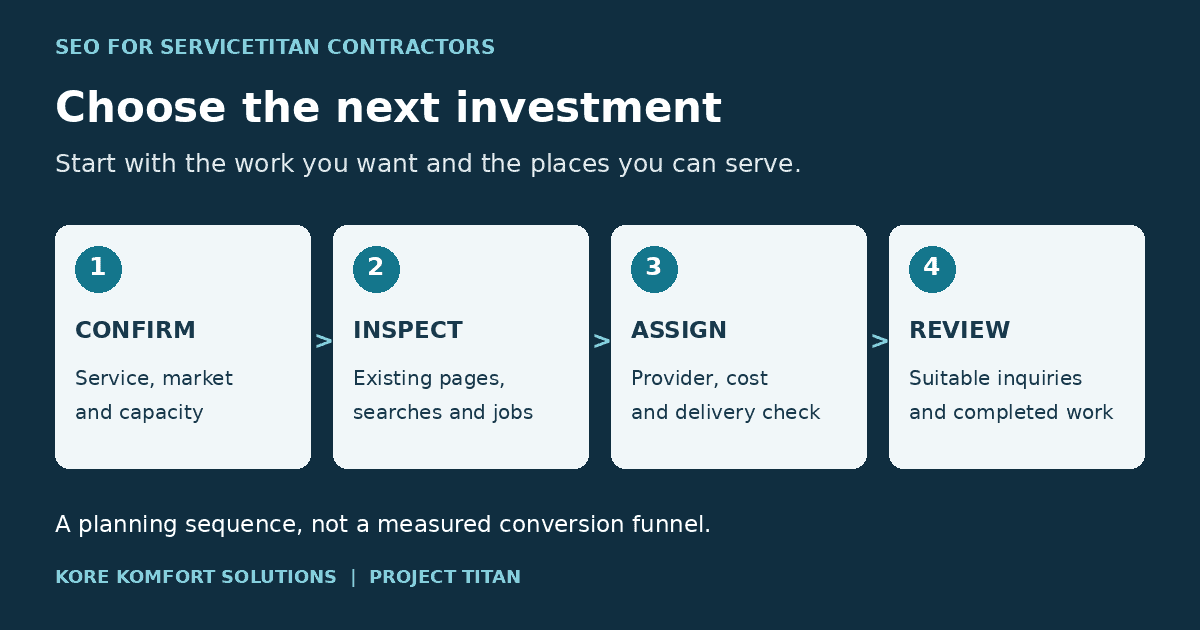
- Confirm the workService, market and capacity
- Inspect the evidenceExisting pages, searches and jobs
- Assign the changeProvider, cost and acceptance check
- Review the outcomeSuitable inquiries and completed work
Planning sequence only. This is not a measured conversion funnel.
Choose a service and market together
“Get us more HVAC leads” is too broad. Replacement estimates, emergency repairs and maintenance calls place different demands on the office and crew. Pick the work before choosing search terms or writing a page.
The owner and operations lead should name the service, customer type, area and crew capacity. Write down which jobs you will decline. Check licenses, equipment and staffing. A costly installation may bring less profit after labor, travel and callbacks.
Completed jobs show where you have worked, not where future demand lies. A market with little recorded work may be worth a look, but missing history does not prove demand. Our completed-job service-area worksheet compares locations without mistaking billed revenue for profit or cash received.
The SEO provider brings search and website evidence. Ask it to group customer searches by service and need, then find the page that should answer each group. Report brand-name searches on their own. Someone looking for your company is different from someone still choosing a contractor.
Keyword-tool volumes are estimates, not promised inquiries. Require the geography, period and data source when a provider presents them. Do not add overlapping keyword variations together and call the result the number of available customers.
What SEO work belongs in the plan?
Ask the provider to name the work, the page or listing it affects, and who will check it. A compact scope can include:
- Useful service and location pages grounded in real coverage, rather than repeated city templates.[5][7]
- Accurate Google Business Profile details and a process for requesting genuine reviews. Local results depend mainly on relevance, distance and popularity; adding a town name does not erase distance.[3][8]
- Pages search engines can reach, clear internal links and a mobile contact path that the office tests after changes.[7]
- Relevant local mentions or earned links where there is a real relationship or useful work to cite. Do not buy a promised ranking position.[3][7]
- Search visibility, suitable inquiries and completed work reported as separate outcomes, with the source gaps stated.[4][6]
This is a work list, not a required package or an order of operations. The ServiceTitan guide for contractors covers the broader website relationship; the booking and lead-capture guide covers the office receiving test.
Compare local competitors without inventing demand
For each candidate service and market, have the provider inspect the first three relevant organic results and the local map results separately. Record the query, date, search location, device and collection method. A search from the office cannot establish visibility throughout the service area.
Read the competing pages. Compare the service explanation, geographic coverage, evidence of relevant work, customer questions and next step. Separate an advertisement, directory and contractor page rather than treating every result as the same kind of competitor. A strong page can provide a useful editorial benchmark without proving that its business wins more jobs.
Google says local results mainly depend on relevance, distance and popularity; its prominence guidance discusses links, review counts and positive ratings.[3]
That makes accurate business information and genuine local evidence worth reviewing. It does not support a promise that adding towns to a profile will overcome distance or secure a particular position.
Ask for a short comparison that ends in a proposed change: which existing page needs work, what answer is missing, what evidence the business can supply, and how the provider will check the result. A list of competitor keywords is research input, not a delivery plan.
Improve the right page before multiplying city pages
Keep a useful existing URL when it already serves the intended customer question. Improve its explanation, service boundaries, project evidence and request path before proposing another page for substantially the same intent. Give a new page a distinct purpose that a reader can recognize.
A service page should explain the work, who it suits, important limitations and what happens after an inquiry. A location page needs useful information about serving that place, such as actual coverage, relevant project examples and locally applicable service constraints. Obtain permission before using customer photographs or identifying details.
Google’s spam policies describe doorway abuse involving substantially similar pages and regional pages that funnel users to another destination. They also prohibit generating many low-value pages primarily to manipulate rankings.[5]
Changing the town name across a template is therefore a poor basis for an expansion plan. Where local evidence is thin, improve a clear regional coverage page instead of inventing neighborhood expertise.
Keep Business Profile details consistent with the real operation. Google requires accurate addresses or service areas and says an unstaffed virtual office is not an eligible business location.[8]
A city page does not create a new branch office.
The provider also needs to check whether search engines can reach the page, whether indexing controls and canonical tags point to the intended URL, and whether internal links make it discoverable. Google recommends logical site organization, descriptive links and useful content in its SEO Starter Guide.[7]
Test the mobile contact path after changes. Use the ServiceTitan booking and lead-capture guide for the separate office-receipt checks rather than treating a working button as a completed inquiry.
Keep search visibility separate from job outcomes
Use the following measurement sequence as a planning aid. It describes different questions to investigate, not a measured conversion funnel or a promise that every visitor can be followed into a job.
| Stage | What to record | What the record does not prove |
|---|---|---|
| Search visibility | Search Console impressions, clicks and query/page groups; local results separately | That a visitor contacted the company |
| Website response | Calls received, forms received and scheduler records, with duplicates identified | That every response fits the desired service and area |
| Suitable inquiry | Office-confirmed service, location and customer need | That the office accepted or scheduled the work |
| Accepted inquiry | Work the office agrees to pursue, with the next action recorded | A won estimate, completed job or payment |
| Completed job | Matched job ID, service, work location and completion date | Collected cash or complete acquisition credit |
| Financial outcome | Defined billed and collected amounts, with cost coverage stated | Profit from incomplete costs or revenue caused solely by SEO |
Define “accepted inquiry” with the office before reporting it. For an estimate-led service, acceptance might mean agreeing to assess the project. Record the later sale separately. For repair work, distinguish a confirmed appointment from a request awaiting office approval. These are recommended reporting definitions, not universal ServiceTitan status names.
Have the provider keep Search Console query and landing-page groups. The office checks which inquiries and jobs it can match. Google omits some queries for privacy, so the export does not show every search.[4] Show unmatched records and unknown sources; do not claim to know the exact keyword behind every job.
How do I track organic SEO results in ServiceTitan?
Start with Search Console clicks and landing pages, then check how the website records the visit source before an inquiry. Have the account administrator document the campaign rules and choose one reporting view, such as First Touch, Last Touch or Assigned Campaign.[4][6][10] Match the call or booking to the office’s inquiry record and, where possible, the actual job service and completed job. Keep paid, branded and unknown-source records separate. A missing source labeled Direct Web Traffic is not verified organic search.[2] Campaign credit shows how a configured report assigns work; it cannot prove how much extra revenue SEO caused.[6]
Check ServiceTitan attribution before calling it SEO revenue
Attribution assigns credit under a reporting rule. ServiceTitan distinguishes a job’s campaign assignment from Attributed Revenue in email dashboards.[6] Put the report name and enabled rules beside any revenue figure used to approve more SEO work.
“Direct Web Traffic” is not verified organic search
Scheduling Pro documentation recommends a default Direct Web Traffic campaign for bookings without attribution information, describing those visitors as likely organic web traffic.[2]
Treat that as a fallback classification, not proof that the customer arrived from a search result. Keep the original missing-source condition visible instead of moving the entire bucket into an SEO success report.
A website phone number alone does not isolate organic calls
A number displayed to every website visitor cannot, by itself, distinguish a search visitor from someone arriving through an advertisement or a direct visit. The reporting needs evidence about the visit as well as the call.
ServiceTitan documents Dynamic Number Insertion, or DNI, which connects website visit information with phone calls. Its current setup guide requires account configuration, a website script and Google Ads configuration for its native DNI route.[1]
Confirm those requirements with the authorized administrator and ServiceTitan contact before buying or changing a tracking setup. Do not assume every ServiceTitan subscription includes the same capability.
The Smart Attribution guide says that a visit from google.com without URL parameters is assigned to “Google Organic.”[6]
That documented rule is useful to inspect, but a campaign label still needs a matched call and job record. Preserve the original referrer and landing-page evidence where available; do not force an organic label onto every page visit.
Campaign rules can change the comparison
ServiceTitan documents a Marketing Attribution Window that can assign follow-up jobs to the initial job’s campaign. It also describes cases where an employee’s campaign change affects the ServiceTitan assignment while conversions sent to Google retain the original inbound-call attribution.[6]
Scheduling Pro’s Marketing Pro Ads integration overrides its manual rules and automatic UTM-based campaign assignment.[2]
The administrator should record the enabled rules before the provider compares periods.
The Marketing Overview documentation offers First Touch, Last Touch and Assigned Campaign views, plus controls for including manual changes. It also says that the Business Unit filter follows campaign business units, not invoice or job business units.[10]
The office should confirm the job’s actual service. A campaign filter does not supply that answer.
Choose one view for the comparison and keep the others for context. Do not add their credited revenue totals together. Better records help with the next decision, but do not prove that SEO changes caused extra business.
Use a priority worksheet with named owners
Copy this blank record for each candidate service and market. The provider supplies search and page evidence; the office supplies inquiry and job information. The owner decides which opportunity deserves the available budget. Blank fields mean the review has not been completed.
| Planning field | Your record | Responsible role |
|---|---|---|
| Desired service, customer type and work location | ____ | Owner with operations lead |
| Capacity, coverage and work to decline | ____ | Operations lead |
| Existing URL and grouped customer searches | ____ | SEO provider |
| Three competing pages, search conditions and missing answers | ____ | SEO provider |
| Original project evidence available for the page | ____ | Operations lead with website provider |
| Inquiry period, suitable inquiries and acceptance reasons | ____ | Office lead |
| Matched completed jobs, financial definition and missing records | ____ | Office with bookkeeping support |
| Enabled attribution rules and known source gaps | ____ | Account administrator with provider |
| Proposed change, cost, delivery owner and review date | ____ | Provider; owner approves |
| Decision: improve, expand, investigate or hold | ____ | Owner |
Avoid a weighted score that hides an unresolved constraint. A high search estimate cannot compensate for work the company cannot perform. Among feasible options, favor the one with a clear customer need, credible evidence and a specific deliverable that the provider can explain and verify.
Worked example: repair capacity versus replacement growth
The following worksheet is entirely hypothetical. The URL is an illustrative path, not a verified client page. No rankings, demand, inquiry totals or job results have been observed. Suppose an HVAC company wants replacement estimates in its established service area. Its emergency repair crew is fully committed, and coverage in a neighboring market is unconfirmed.
| Planning field | Hypothetical record | Who checks or acts |
|---|---|---|
| Desired service and market | Replacement estimates in the existing service area; customer type and exact boundaries still to confirm | Owner and operations lead |
| Capacity and work to decline | Replacement crew capacity must be confirmed; do not expand emergency promotion now | Operations lead |
| Existing URL and customer searches | Proposed /air-conditioning-replacement/; group searches about replacement and estimates; actual queries not yet collected | SEO provider inventories pages and Search Console |
| Competitors and missing answers | Three relevant organic pages and map results still to review under recorded search conditions; proposed gap is the assessment and estimate process | SEO provider records comparison before approval |
| Project evidence | Permissioned replacement photographs and coverage details proposed, not yet collected | Operations lead supplies; provider checks permission |
| Inquiries and completed jobs | Baseline period, suitable estimates, accepted work, sold jobs, completed jobs and costs all unfilled | Office and bookkeeping support reconcile records |
| Attribution | Enabled rules and unknown sources not yet checked | Account administrator records settings; provider checks reporting view |
| Proposed change and review | Improve the existing page’s assessment explanation and contact path, subject to inventory; provider owns delivery and office receipt test; owner approves cost and dated review point | Provider, office and owner |
| Decision | Conditional GO for inspecting the replacement page; HOLD neighboring-market expansion until coverage is confirmed | Owner |
The owner can approve the page repair after the provider confirms the page and scope. The office must still test receipt of a replacement inquiry after delivery. Neither the example nor a completed worksheet would prove that the page produced additional jobs.
Agree what the provider will deliver and when to review it
An SEO proposal should identify the pages it will improve, the supporting evidence needed, technical work, tracking checks and reporting responsibilities. Separate content and management fees from software, call tracking and paid media. Do not accept a ranking promise in place of an accountable scope.
First, the provider shows the changed URL, page content, indexing controls, internal links and mobile contact path against the agreed scope. The office sends an authorized test inquiry and confirms that it arrives with the right service and location; a button click alone is not receipt. Record any failure and fix it before calling delivery complete. At the later agreed review point, compare Search Console page and query groups with suitable inquiries, accepted work and matched completed jobs for a comparable period. Keep the original baseline, a dated change log and unknown sources. A brief rise or fall is not proof that the plan worked.
Expand when the business can serve the market, the work has been delivered and the available evidence supports the next investment. Investigate when visibility improves but suitable inquiries do not. Hold further promotion when capacity is unresolved or the receiving path fails. Incomplete attribution should limit claims about returns, not automatically stop useful website repairs.
Questions contractors ask
Does using ServiceTitan improve Google rankings?
Using ServiceTitan is not a substitute for SEO. Improve the website and local business information that customers and search engines use, then use supported account reporting to examine inquiries and jobs. Neither a software subscription nor an attribution report guarantees a search position.
Should we create a page for every city we serve?
No. Create a distinct location page when it provides useful information that an existing page does not. Confirm actual coverage and supporting evidence first. Improve a regional page when separate city pages would mostly repeat the same content.
Can ServiceTitan tell us exactly how much revenue SEO caused?
A configured report can assign revenue to campaigns under its attribution rules. That is different from proving how much additional revenue SEO caused. Check source capture, campaign settings, manual changes, matched jobs and the financial definition before using the figure to change spending.
What should we ask an SEO provider to report?
Ask for completed work and search visibility alongside suitable inquiries, accepted work, matched completed jobs and clearly defined financial outcomes. Require the reporting period, attribution rules, missing records and next recommended action. Keep branded searches, paid traffic and unknown sources distinguishable.
About this guide
Research reviewed October 24, 2026. This is an independent KKS guide; KKS sells website and marketing services. Product capabilities come from public documentation, not tests in a customer’s ServiceTitan account. Account access and configuration require confirmation. The worksheet and worked example are planning aids, not completed implementation evidence.
Sources
- https://help.servicetitan.com/how-to/dynamic-call-tracking-using-dni
- https://help.servicetitan.com/docs/track-lead-attribution-and-scheduling-pro-jobs
- https://support.google.com/business/answer/7091?hl=en
- https://support.google.com/webmasters/answer/17011259?hl=en
- https://developers.google.com/search/docs/essentials/spam-policies
- https://help.servicetitan.com/v1/docs/marketing-pro-ads-smart-attribution
- https://developers.google.com/search/docs/fundamentals/seo-starter-guide
- https://support.google.com/business/answer/3038177?hl=en
- KKS website and marketing plans
- Use Marketing Pro Ads Analytics