ServiceTitan publishes per-technician pricing and three package names, but its public pricing page does not list dollar rates. You need a written quote to price your business. Count the software, setup, selected add-ons, usage charges and the work needed to put the system into service. Keep website costs, marketing services and advertising spend on separate lines.[1][2]
The decision is whether the proposed setup solves your operating needs at a cost you can support. A monthly subscription figure cannot answer that alone. Neither can an online price range based on another contractor’s account.
This guide helps you compare a proposal, assign the missing questions and build a first-year budget. For the broader relationship between software and your website, start with our ServiceTitan guide for contractors.
What ServiceTitan pricing tells you, and what still needs a quote
ServiceTitan’s pricing page names Starter, Essentials and The Works. It describes pricing as per technician. The current public terms also define paid user types through the applicable order form and say administrative users may be included in specified quantities at no extra charge.[1][2]
| Official package | Features listed in its package column | Confirm in your quote |
|---|---|---|
| Starter | Dispatching, scheduling, call booking, invoicing and pricebook.[1] | Included users, required workflows and price |
| Essentials | The same five core functions, plus mobile estimates and payroll management.[1] | Payroll scope, user minimums and price |
| The Works | The five core functions, mobile estimates, configurable payroll, advanced reporting, commission tracking and customizable memberships.[1] | Required configuration, selected Pro products and price |
These are the feature lists on ServiceTitan’s public package page, reviewed October 24, 2026. Confirm the included features and exclusions in your written quote. A package name does not establish every Pro entitlement or the work needed to configure it.[1]
Ask the sales representative to identify each billable user type, the included quantities and any minimum commitment. Do not assume that all employees are billed alike, or that office access is unlimited and free.
| Cost or commitment | What public documentation establishes | What to obtain for your business |
|---|---|---|
| Base subscription | Package names and a per-technician pricing model are published.[1] | Dated price, user classifications, quantities, minimums and billing frequency |
| Pro products and add-ons | The terms describe additional subscriptions and usage charges; the Pro page lists several products.[2][7] | Each included or optional product, its price and the end of any discount |
| Implementation | ServiceTitan describes onboarding and customer training.[6] | Deliverables, data responsibilities, fees, billing start and acceptance checks |
| Payment processing | ServiceTitan’s Payments FAQ describes custom merchant pricing.[5] | Your merchant schedule, payment methods, transaction charges and other fees |
| Contract length | The September 16, 2026 public terms defer to an incorporated order form or written agreement.[2] | Applicable terms version, initial term, renewal date and notice requirements |
| Website and marketing work | These are separate items to identify in your complete operating budget | Existing contracts, proposed changes, management fees and advertising spend |
Compare written proposals for the same users, functions and delivery responsibilities.
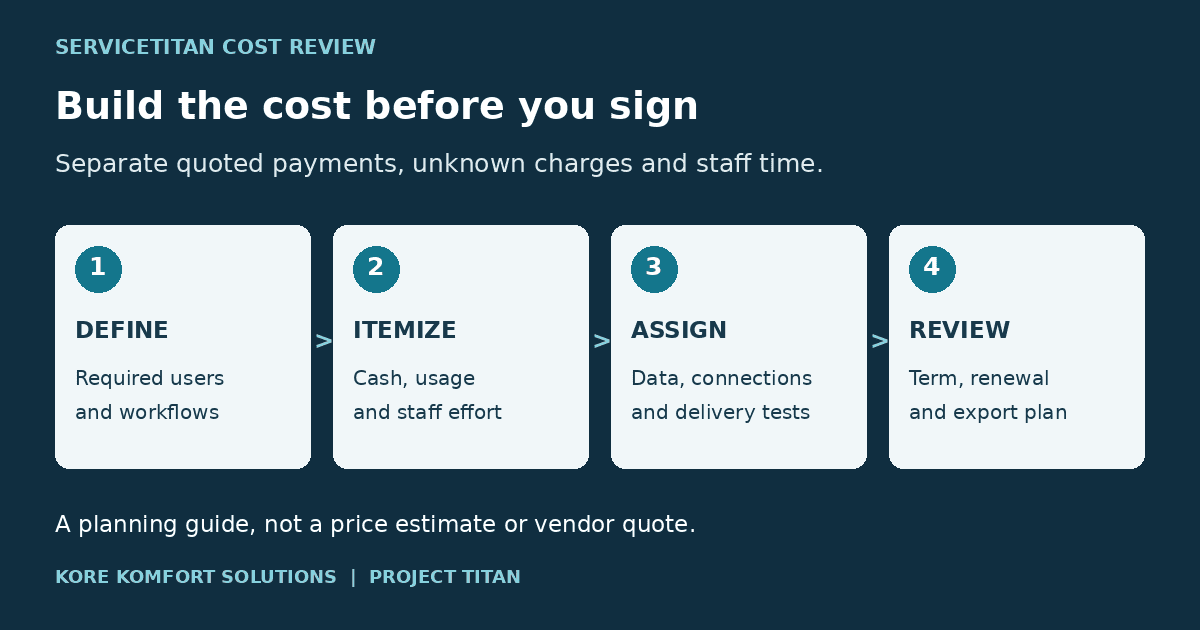
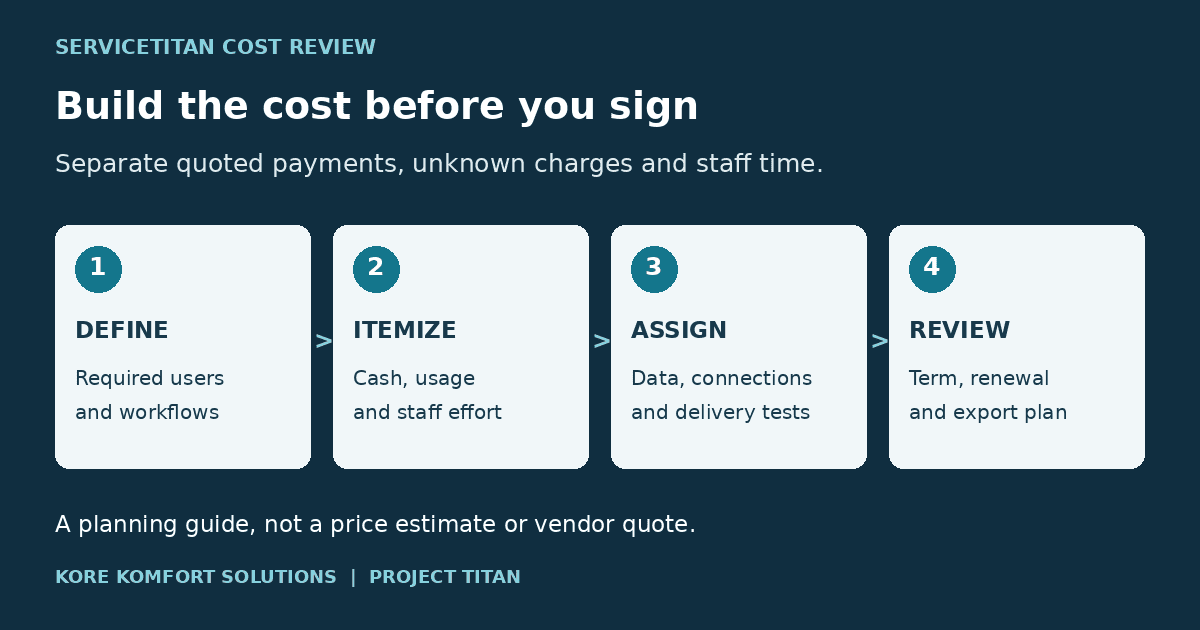
- Define the scopeRequired workflows and users
- Itemize the costCash, usage and staff effort
- Assign deliveryData, connections and tests
- Review the commitmentTerm, renewal and exit plan
Recommended planning sequence. No prices or customer outcomes are represented.
Build an itemized cost worksheet
Use one row per charge and record who supplied it. Mark each amount as quoted, estimated, included or unresolved. A blank price is not zero. An included service needs a defined scope so the same work does not reappear in another supplier’s bill.
| Budget line | Record before approval | Who supplies or checks it |
|---|---|---|
| Software subscriptions | User type, count, minimum, unit rate, billing start and committed term | ServiceTitan representative; owner approves |
| Selected Pro products | Included features, separate subscriptions, promotional end dates and dependencies | ServiceTitan representative with account administrator |
| Usage and processing | Rate schedule, expected quantities, payment-method mix, minimums and applicable taxes | Provider and bookkeeping lead |
| Onboarding and migration | Records to import, cleanup work, training, configuration and written acceptance criteria | Implementation lead with office lead |
| Integrations | Connection, setup owner, external fees, testing and ongoing support | Authorized technical provider and administrator |
| Hardware and access | Devices, connectivity and any equipment required by the selected workflow | Operations lead |
| Website work | Keep, repair or rebuild; booking links, forms, tracking and office receipt tests | Website provider with office lead |
| Marketing delivery and media | Management work, creative or campaign services, advertising budget and usage spend | Marketing provider; owner approves |
| Transition overlap | Old subscriptions, temporary support and the actual cancellation dates | Office lead and bookkeeping |
| Internal staff effort | Training, data preparation, testing and ongoing administration hours | Department leads |
| Exit and renewal | Notice deadline, future rates, export format, assistance fees and remaining obligations | Owner with adviser where needed |
The worksheet includes possible charges from ServiceTitan, other vendors and your own staff. Mark each line by supplier when you compare the software quote with the full business budget.
Download the blank first-year cost worksheet. Enter only amounts supported by your proposal or your own assumptions. Its separate cash, unresolved and staff-effort views do not turn blanks into zero-cost claims.
Copy this request to your sales representative
Please send an itemized, dated quote showing our package, included features, billable user types and minimums; subscription and add-on rates, usage and payment-processing schedules, discounts and their end dates; onboarding and migration deliverables, fees and billing start; and the applicable order form and terms for the initial term, renewal, notice, early exit and data export. Please mark any item that depends on our account or needs a separate provider quote.
Check add-ons and usage without double counting
ServiceTitan’s terms describe charges for activated Pro or add-on subscriptions and usage such as direct mail pieces. The Pro overview names products including Marketing Pro, Scheduling Pro and Dispatch Pro, but a product listing does not establish what your package includes.[2][7]
Request a line-by-line entitlement list. For a discounted product, record the discount’s end date and the price afterward. For usage, keep the quantity assumption beside the rate. Ask which charges are billed by ServiceTitan and which come from another provider.
The Marketing Pro FAQ describes different packages and directs customers to their customer success manager. It says current direct-mail costs are visible in the campaign builder.[4] Confirm that account information rather than treating an old screenshot as a current rate. Our Marketing Pro and agency responsibility guide explains the separate delivery work to assign.
Separate processing fees from software fees
The Payments FAQ says merchant pricing is custom. It also says the Online Payments feature has no additional fee while credit-card processing charges still apply.[5] “No additional feature fee” does not mean free payment processing.
Have bookkeeping estimate charges using the proposed merchant schedule and your expected payment mix. Where a schedule uses a percentage plus a transaction charge, calculate both. Do not apply a percentage to all company revenue when only some payments would pass through that method. Include other applicable schedule charges, and compare the same payment mix across alternatives.
Calculate first-year cash and staff effort separately
Choose the budget period before adding amounts. For a full first year, use twelve months from the agreed start date. A shorter calendar-year budget, an annual prepayment and a multi-year commitment answer different questions. Record when cash is due, not just the monthly equivalent shown in a proposal.
First-year cash outlay includes scheduled subscription payments, one-time external charges, estimated usage and other cash costs in the selected period. Internal resource cost also counts the staff time assigned to preparation, training and support. Keep those views separate: existing salaries do not become an extra cash payment merely because you allocate hours to this project.
For later years, remove completed one-time work but retain recurring support. Recalculate user counts, usage and rates at each known change date. Do not multiply year one by three and call the result a three-year estimate. If renewal prices are unknown, show an explicit assumption and a sensitivity case rather than presenting a fixed total as contracted.
Hypothetical budget example, not a ServiceTitan price estimate
The figures below are hypothetical, not vendor rates or a customer quote. Assume twelve monthly payments with no rate or user-count changes. Usage charges, processing, taxes and equipment remain unresolved and are excluded from the subtotal.
| Hypothetical line, not a vendor rate | Hypothetical assumption | Hypothetical first-year amount |
|---|---|---|
| Proposed software subscription | $2,000 per month for 12 months | $24,000 |
| Selected software add-on | $300 per month for 12 months | $3,600 |
| External onboarding | One-time charge | $4,000 |
| External connection setup | One-time charge | $1,500 |
| Website management | $250 per month for 12 months | $3,000 |
| Advertising media | $500 per month for 12 months | $6,000 |
| Old-system overlap | $300 per month for 2 months | $600 |
| Hypothetical listed cash subtotal, excludes unresolved charges | Sum of the listed cash lines | $42,700 |
| Internal time allocation | 80 hours at a $40 loaded hourly cost | $3,200 |
| Hypothetical listed cash plus allocated staff effort, excludes unresolved charges | Not an additional cash payment | $45,900 |
The software subscription is only one part of this example. The website and advertising lines belong to the broader operating plan, not necessarily to the software vendor. Bookkeeping must fill the unresolved lines before calling the result a complete budget. Keep staff costs out of the cash subtotal unless they create an additional payment, and avoid counting the same labor twice.
Get an implementation scope, not just an onboarding label
ServiceTitan describes training during onboarding and a customer success manager after go-live.[6] Its commercial Getting Started guide describes preparing data, pricebook and accounting information, then working with implementation staff on imports, integrations and configuration.[8] Those descriptions help you ask better questions. They do not establish your included datasets, training hours, fees or launch date.
Ask the implementation lead to attach a scope to the proposal. It should identify the source system, records and attachments to move, what will not transfer, who cleans the data and how the team will check the import. Have the office identify the records it needs to operate and the history it must retain.
Agree on a small set of real work scenarios for testing, with authorized test data. Depending on the purchased scope, those could cover receiving a request, booking work, preparing an estimate, invoicing and checking the accounting export. Assign the person who accepts each result. A training session completed is not the same as a working accounting connection.
Record the dependencies and the date charges begin. Ask what happens if a dependency is late, which support is included and how additional work is approved. Do not assume billing waits for your preferred launch date unless the agreement says so.
Your website is a separate workstream. Keep useful pages and working customer paths while the software setup proceeds. Scope any scheduler, ordinary form or tracking change explicitly, then have the office confirm receipt. The booking and lead-capture checklist provides those acceptance checks.
Read the applicable contract before choosing an exit date
The public Terms of Use reviewed on October 24, 2026 were last updated September 16, 2026. They define the agreement together with incorporated order forms and attachments.[2] Read the version that applies to your account and any separate written terms. The points below explain the public document, not your individual legal position.
Term and renewal
Your incorporated order form or other written agreement sets the term. If the public terms are the sole agreement, Section 5(a) instead uses a month-to-month term that renews automatically unless either party gives at least thirty days’ written nonrenewal notice. It accepts notice to billing@servicetitan.com.[2] Record your actual term, renewal date, notice deadline and delivery route, and keep proof of receipt.
Early termination and additional subscriptions
Section 5(c) requires payment of remaining committed amounts for early termination, subject to its material-breach and insolvency provisions. Section 4(c) addresses cancellation of additional subscriptions before renewal.[2] An add-on cancellation does not end the base agreement. Have an adviser check your actual documents before calculating an exit amount or relying on an exception. Stopping use or removing a user does not prove billing has stopped; minimum subscription levels and limits on unassigning paid users also matter.[2]
Price changes and data export
Section 4(b) permits fee changes with at least thirty days’ notice unless an incorporated order form or written agreement says otherwise.[2] Check your price protection and the rate after a promotion. A projected increase is not a contractual cap.
Section 5(e) promises commercially reasonable efforts to provide data on request after termination, subject to restrictions and possible service fees. It does not guarantee complete or timely delivery, requires no retention beyond sixty days, and allows a database backup or another format ServiceTitan chooses.[2] Before access ends, ask about scope, format, fees and timing; have the receiving provider inspect a permitted sample. This is not a promise of a free CSV or a usable import. If only the website changes, use the website-provider change guide.
Decide whether the proposed setup earns its cost
Use the work your company needs to do, not an arbitrary revenue threshold. Ask the people who will use the system to demonstrate the required workflows. Give each claimed benefit a baseline, a responsible person and a review date.
A shorter administrative task may free time without reducing payroll. A larger estimate is not collected profit. Avoid counting the same improvement once as labor savings and again as additional revenue unless the assumptions support both. Compare the proposed system with the current process and other written proposals on the same basis.
Approve when the required workflows are demonstrated, the cash schedule is affordable, the delivery responsibilities are assigned and the unresolved costs are acceptable. Hold when a material integration, billing start or contract obligation remains unclear. A provider should be able to explain what will be delivered and how your team will accept it.
Questions contractors ask
How much does ServiceTitan cost per technician?
The public pricing page describes per-technician pricing but does not publish a dollar rate. Obtain a written quote identifying the package, billable user types, included quantities, minimums and add-ons. Another contractor’s reported payment is not a verified price for your account.[1][2]
Does ServiceTitan charge an implementation fee?
The public sources reviewed do not establish a universal implementation fee. Request an itemized onboarding scope and written price, including any included work. Keep data preparation, migration, training, connections and internal staff time visible even when a supplier bundles its charges.[6][8]
Is ServiceTitan month-to-month or an annual contract?
Check your order form and applicable agreement. The September 16, 2026 public terms defer to an incorporated written agreement for the term. Their month-to-month fallback applies only when those terms are the sole agreement, with the stated renewal and notice requirements.[2]
Does the software quote include website and advertising costs?
Do not assume it does. Ask which website, campaign, management and media services the quote includes, then price the remaining work separately. Identify each supplier and deliverable so a bundled charge and a separate provider fee do not pay for the same work twice.
Can I compare ServiceTitan with cheaper software using monthly price alone?
No. Compare the same required workflows, user counts, implementation work, usage assumptions and contract period. Keep cash payments separate from staff effort and projected benefits. A lower monthly figure does not establish a lower complete cost or an equivalent operating fit.
About this guide
Research reviewed October 24, 2026. KKS sells website and marketing services. This guide uses public vendor documents, not customer order forms or tests inside a ServiceTitan account. Contract applicability and quoted scope require account-specific review. The worked amounts are hypothetical. This guide is not individual legal advice.
Sources
- https://www.servicetitan.com/pricing
- https://www.servicetitan.com/legal/terms-of-use
- https://help.servicetitan.com/docs/marketing-pro-v2-faq
- https://help.servicetitan.com/docs/payments-faq
- https://www.servicetitan.com/features/onboarding
- https://www.servicetitan.com/features/pro
- https://help.servicetitan.com/commercial/docs/getting-started-with-servicetitan-home
- KKS website packages and existing-site scope